Quick answer. Putting habits and tasks in the same app pays off when they compete for the same hours, which is nearly always. Your morning does not distinguish between "meditate for ten minutes" and "call the bank": both come out of the same gap. What you need is one day list where both show up, one number that counts both, and separate places for whatever is not happening today. What does not work is stuffing habits into a task app as repeating tasks: it clutters the list and leaves you with no record of consistency.
In this guide
- Why two apps let things slip
- What is a habit, what is a task, and what is neither
- The three ways to merge them, and the one that fails
- What you only see when they share a list
- What is still worth keeping apart
- How to move everything in one afternoon
- How Monkway does it
Why two apps let things slip
The usual split sounds reasonable: a habit app for what repeats, a task app for what has a date. The trouble shows up on Tuesday evening, when you have one free hour and have to choose between going for a run and finishing the quote. Those two things live on different screens, and neither one knows the other exists.
Three failures come out of that.
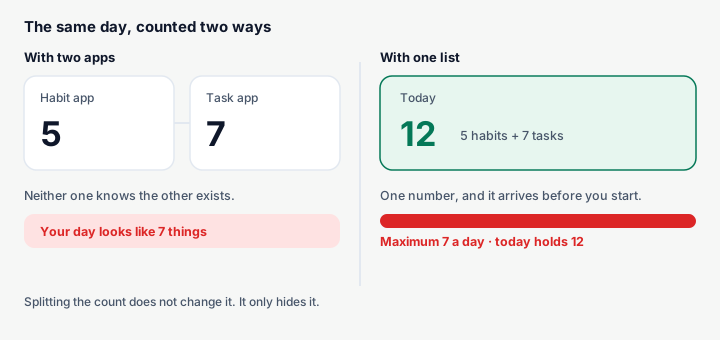
The first is the count. If you plan seven tasks and also carry five daily habits, your day holds twelve things, not seven. Nobody tells you, because each app counts only its own. You finish the day feeling busy and behind, and the correct diagnosis is that the day was full before it started. That is the same issue covered in how many tasks to plan per day, only with half the data in view.
The second is the cost of going back and forth. Rubinstein, Meyer and Evans measured the cost of alternating between tasks in 2001 and found consistent time losses whenever you have to reconfigure what you are doing. Applied here: every check of your day costs twice as much, so you check less often, and when you check less often things fall through.
The third is about deciding. When something does not fit cleanly as a habit or a task — an idea, a maybe, something that depends on someone else — it ends up in a third place: phone notes, a message to yourself, a scrap of paper. And there it stays.
What is a habit, what is a task, and what is neither
Before picking a tool, it helps to be clear about the categories, because most of the mess comes from filing something in the wrong one.
| Type | How you spot it | What it needs measured | Example |
|---|---|---|---|
| Habit | Comes back on its own, with no end date | 30-day completion rate | Read for 20 minutes |
| Weekly habit | Comes back, but not every day | Times done this week | Run 3 times |
| Task | Done once, then gone | Done or overdue | Renew your passport |
| Dated task | Done once, on a specific day | Days it has been postponed | Send the quote on Thursday |
| Undecided | You do not know if you will do it | How long it has sat undecided | "Look into that German course" |
| Goal | Many things across months | Progress and consistency | Pass the certification |
The last two rows are the ones almost no app covers, and they are exactly the ones that create the noise. A goal filed as a task shows up every Monday as an impossible line and gets postponed forever. Something undecided filed as tomorrow's task turns tomorrow into a dumping ground.
There is another reason not to blur habits and tasks: they are not measured the same way. A task has two states, done or not done. A habit only makes sense over a long window, because missing one Tuesday means nothing and missing eleven days out of thirty means a lot. Using activity diaries, Wood, Quinn and Kashy documented in 2002 that a large share of daily behaviour repeats almost every day in the same context — around 43% of the actions their participants recorded were of that kind. That is what you are trying to build with a habit, and a "done" checkbox does not capture it.
The three ways to merge them, and the one that fails
There are three ways to keep both in one place. Two work, and the third is the one nearly everybody tries first.
| Approach | How it works | What you gain | Where it breaks |
|---|---|---|---|
| Habits as repeating tasks | In a task app, set "repeat daily" | Nothing new to learn | No consistency data; the list fills with noise |
| Tasks inside a habit app | Add one-off checks that never repeat | A single place to look | No dates or overdue; tasks get lost |
| Two real types, one view | The app knows habit from task and shows both in Today | A true day count and the right metrics | You have to choose correctly when creating each one |
The first is the one that fails. When a habit is a repeating task, there is no history: checking it creates the next instance and the previous one disappears. A month later, if you want to know whether you are reading more than in August, there is nowhere to look. And an unchecked habit behaves like an overdue task, so within days you have twenty red lines for habits that were not due.
The opposite case, tasks inside a habit app, fails more slowly but it still fails. Tasks need dates, overdue states, and somewhere that shows they have been waiting three weeks. Without that you tick a few and the rest evaporate. Habit app versus PDF or Notion covers the same problem seen from the generic-tool side.
The third is the one that works: two different types under the hood, one list on the surface. Each thing gets measured properly and you only look at one screen.
What you only see when they share a list
Merging them is not only convenience. Three pieces of information appear that simply do not exist with two apps.
| What appears | What it tells you | What you do with it |
|---|---|---|
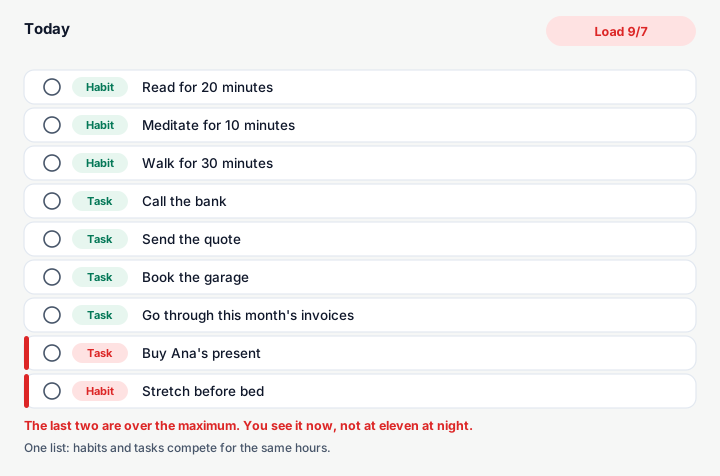
| The day's real load | How many things today holds, both kinds added | If it passes your maximum, move one before you start |
| Habit and task colliding | The habit drops on exactly the day that is packed | Change the habit's time, not your intentions |
| Tasks that are really habits | The same task shows up every week | Convert it, and it stops asking for a decision |
| Habits that were really tasks | "Clear out the garage" has been a daily habit for two months | Turn it into a dated task and finish it |
| Genuinely empty days | No habits and no tasks | That is where the big thing goes, not Tuesday |
The second one is the most useful and the least obvious. A lot of people think they have a consistency problem when what they have is a calendar problem: the habit does not drop at random, it drops on Thursdays, which is the day with four meetings. With two apps that pattern is invisible, because the full Thursdays live in one and the missed habit in the other.
The third saves effort too. If "review the accounts" returns every Sunday and every Sunday you do it, it already behaves like a habit, and converting it takes it out of the weekly decision queue. The fourth is the reverse move: a habit with an ending never finishes while it stays a habit.
What is still worth keeping apart
One shared list has a limit. These four things do better in their own place, even inside the same app.
| What | Where it belongs | Why not in the day |
|---|---|---|
| Anything undecided | A separate backlog | If it goes to tomorrow, tomorrow becomes the dumping ground |
| Multi-month goals | Grouped under the goal | Only its pieces fit in a day, never the goal itself |
| Notes | With the habit or the day they belong to | A note cannot be completed, so it is not a list line |
| Anything waiting on someone else | As "ask again" with a date | Otherwise it takes a slot every day with no way to move |
The first is what most people are missing. Without a place for the undecided, anything doubtful always lands on tomorrow, and that is what makes tomorrow's list impossible before it starts. Masicampo and Baumeister showed in 2011 that unfinished goals keep intruding on your thoughts and that making a concrete plan reduces that intrusion. You do not have to do it today: it is enough that it is written somewhere you will actually look.
As for goals, breaking one into daily pieces works better than putting the whole thing on a single day. Today's habit and today's task go in the day; the goal lives above it.
How to move everything in one afternoon
If you already have two apps with things in them, this is a single sitting of about forty minutes. There is nothing to import.
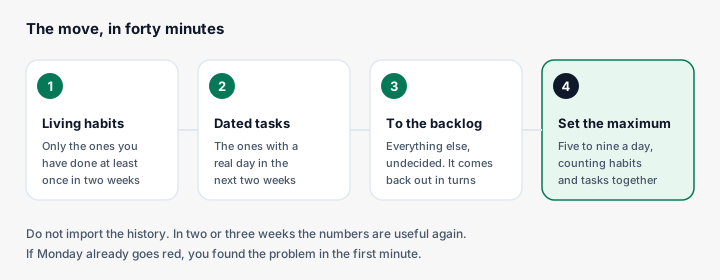
- Habits first, and only the living ones. Open your habit app and copy across only the ones you have actually done at least once in the past two weeks. You were not doing the rest. If you end up with more than eight, read how many habits to start at once before copying them all.
- Then the dated tasks. Only the ones with a real day in the next fourteen. Set the date as you copy them.
- Everything else goes to the backlog. Do not decide anything. What had been sitting in your to-do list for months does not start moving because it changed apps.
- Set the daily maximum before you look at anything. A number between five and nine, counting habits and tasks together. If Monday already goes red when you do it, you found the problem in the first minute.
One warning about step three: the first time, the backlog looks enormous. That is normal, because the same pile was spread across three places and you never saw it together. It shrinks on its own as you decide four or five things each time you open it.
Do not copy the history over. Habits take a few weeks to produce useful numbers again, and whatever mattered in the old history you already know by heart.
How Monkway does it
Monkway is built on that third approach: habits and tasks are different things underneath and the same list on the surface.
- Today is one list. Today's habits and today's tasks come out together, in order, with no tabs. You check them and they leave the pending side.
- The load adds both up. At the top you see "Load 6/7" counting habits and tasks. When you try to schedule something on a full day, you get "That day has 7 of 7. Schedule it anyway?" with the option to move it. You set the maximum yourself in Progress → Pace, and the app suggests one based on what you have actually closed over the last 28 days.
- Each type is measured properly. Habits get a 30-day completion rate, a streak and consistency; tasks get a date, an overdue state and a count of how many times you postponed them. In Progress they sit in separate tabs, because they answer different questions.
- The Backlog holds the undecided. You write it down in two seconds without picking a type. When you know what it is, you hit Decide and choose today, another date, or turn it into a habit. Progress shows how many things are still undecided and how long they have been there.
- Converting goes both ways. A task you keep repeating becomes a habit at whatever frequency you pick, and a habit that turned out to have an ending can be closed and left as a dated task.
- Journeys carry the long things. A journey groups the habits, tasks, backlog items and notes of one effort, and shows progress, 30-day consistency and days remaining. The goal never drops into your day; its pieces do.
- The weekly review checks all four corners. Once a week it shows overdue tasks, weak habits (under 40% over 30 days), stalled journeys and stale backlog items, each with one action.
The idea underneath is that a day is a single resource. If two systems divide up that same day without talking to each other, the total will always come out bigger than what fits.
Frequently asked questions
Is one app for everything better than a specialist for each?
One app for everything, as long as it keeps the types distinct underneath. What you gain is the true day count, which is exactly what specialists cannot give you.
Can I just keep my habits as repeating tasks?
You can, but you lose what makes a habit useful: the completion rate across weeks. Unchecked habits also show up as overdue and clutter the list.
How many things should a day hold, habits and tasks combined?
Five to nine for most people, with three habits and three or four tasks as a reasonable split. The exact number comes from looking at how many things you actually close per day.
Where do I put things I am not sure I will do?
In a separate backlog, never on tomorrow. Deciding is a different moment from doing, and mixing them is what makes the next day's list unworkable.
When should I convert a task into a habit?
Once you have done it three times across different weeks and you know it will come back. As a habit it stops asking for a weekly decision and starts being measured properly.
And the other way round — when should a habit be a task?
When it has an ending. "Clear out the garage" or "learn the spreadsheet" get finished, so as habits they stay open forever and drag your completion rate down for no reason.
Do I lose my data when I switch apps?
The history, usually yes, because the formats do not line up. It is worth starting clean: in two or three weeks the numbers are useful again, and meanwhile you are already on one list.
Start by counting tomorrow
Before switching anything, run a test that costs a minute. Take tomorrow, add the tasks you have scheduled to the habits you intend to do, and write the number down. If it is over nine, you now know why your days pass without progress, and consistency was never the problem.
If you would rather the app did that sum and warned you before you accept one more thing, Monkway is free to start, on iPhone and in the browser. And if what you have is a pile carried over from earlier weeks, the step before this one is deciding on the tasks you keep postponing before you move anything anywhere.