Quick answer. To turn a daily step goal into a habit that checks itself off, you need a habit app that reads your steps from Apple Health and compares them with a daily target. Base that target on what you already walk in a normal week, not on a famous number. When Health records enough steps, the app marks the habit as done without you tapping anything. Your part is to walk and to open the app that day so it can check your steps.
What you'll find here
- What it means for a habit to check itself off
- Which step target to choose
- Where your iPhone's step count comes from
- When the habit gets checked and when it doesn't
- Why a planned walk still helps
- How to tell if your target is right after a few weeks
- How Monkway handles it
- FAQ
This content is educational and is not medical advice. The right number of steps depends on your health, your mobility and your situation. If walking causes pain, dizziness or unusual shortness of breath, stop and talk to a healthcare professional. If you're following a rehabilitation plan, its instructions come before any target in an app.
What it means for a habit to check itself off
You check a normal habit yourself. You do it, open the app and tap the circle. For steps this makes little sense, because your phone is already counting them all day.
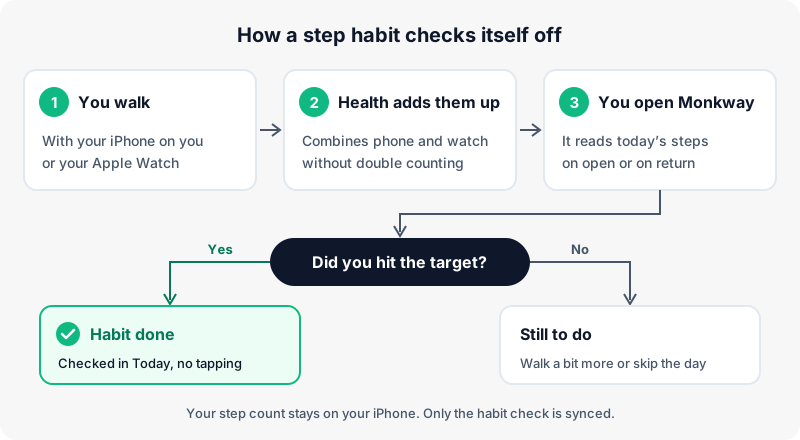
A habit that checks itself off uses data that already exists. On an iPhone, the Health app stores it. The habit app reads today's count, compares it with your target and, if you got there, marks the day as done.
In practice, one step disappears. You no longer have to remember to check it. You also don't have to decide whether 7,600 steps "count" when your target was 8,000. The rule is fixed and the app applies it.
| Step habit you check by hand | Step habit that checks itself off | |
|---|---|---|
| Who decides it's done | You, looking at the counter | The app, using the Health figure |
| What you have to remember | Look at your steps and tap | Just walk and open the app that day |
| Days you forget to check it | Show as missed even if you walked | Get checked as soon as you open the app |
| Temptation to round up | High: "close enough, I'll tick it" | None: you either hit it or you don't |
| What you see at the end of the week | What you remembered to log | What you actually walked |
If you already track a walking habit by hand, the automatic one doesn't fully replace it. You'll see why further down.
Which step target to choose
A good target is one you hit most days with some effort. If you always hit it without thinking, nothing changes. If you almost always miss it, you'll stop looking.
10,000 steps is the best-known figure, but no rule says everyone has to reach it. The World Health Organization gives its guidelines for adults in minutes of activity per week, not in steps. A systematic review published in The Lancet Public Health in 2025 found that more daily steps were associated with lower risk across several health outcomes, and its authors suggested around 7,000 steps as a practical target for part of the population. These are associations in large groups of people. They don't tell you which number suits you.
For your habit, the most useful starting point is your own average. Open Health, look at your steps for the last seven days and work out the average for a normal week. Then pick the target with this table.
| Your average last week | First target | When to think about raising it |
|---|---|---|
| Under 3,000 steps | Your average rounded up, for example 3,000 | When you've hit it nearly every day for three weeks |
| 3,000 to 6,000 steps | Your average plus about 1,000 | After three weeks hitting it five or more days out of seven |
| 6,000 to 9,000 steps | Your average plus 500 to 1,000 | When raising it won't force you to change your schedule |
| Over 9,000 steps | Your average, no increase | Only if you want to walk more for a specific reason |
This table gives you a starting point. If you have medical advice, follow that instead. What matters is that the target comes from your own data. That way your first month has more hits than misses.
One important detail: pick the number carefully from the start. In many apps, Monkway included, the target is set when you create the automatic habit. Changing it every week would also leave you without a stable reference.
Where your iPhone's step count comes from
Your iPhone counts steps with its motion sensors while you carry it. If you wear an Apple Watch, the watch counts them too. Health combines both sources and works out the day's total.
When it adds them up, Health doesn't count the same step twice, even if you carry your iPhone and wear your watch at the same time. Apps that read steps usually ask Health for that ready-made total. Apple describes it in the documentation for HKStatisticsQuery, the query that returns sums such as today's steps.
| Step source | What it counts well | What it misses |
|---|---|---|
| iPhone only | Walks and commutes with the phone in your pocket | Walking while the phone sits on a desk or charges |
| iPhone and Apple Watch | Almost the whole day, at home too | Very little, as long as you wear the watch |
| Another brand's fitness band | Whatever that brand sends to Health | Depends on its app syncing with Health |
| Treadmill or exercise bike | Sometimes the steps, if you wear a watch | A bike usually adds no steps |
If you walk a lot around the house or the office with your phone on the desk, an iPhone on its own will record less than you do. A habit app can only read what Health has recorded. Keep that in mind when you pick the target: if you only use an iPhone, start from your iPhone average.
When the habit gets checked and when it doesn't
The habit app doesn't watch your steps every second. In Monkway, steps are checked when you open the app or come back to it. If you've hit your target at that moment, today's habit gets checked.
This has consequences. If you reach 8,000 steps at six in the evening and don't open the app until the next day, that day stays unchecked. The check always uses today's steps.
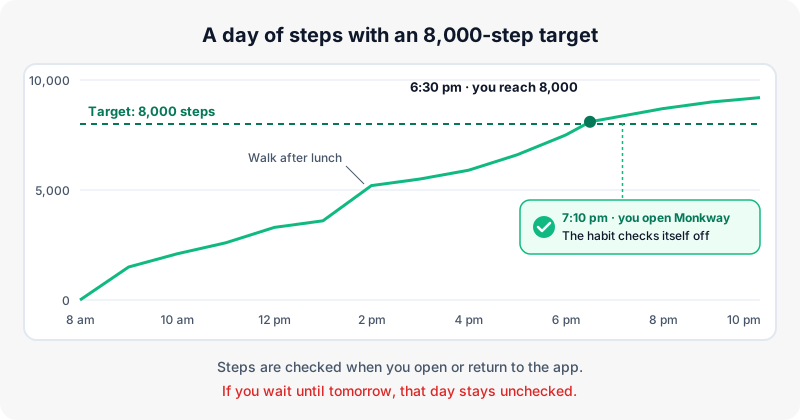
These are the situations that come up most and what to do with each one.
| Situation | What happens to the habit | What to do |
|---|---|---|
| You hit the target and open the app that day | It checks itself off | Nothing |
| You hit the target but don't open the app until tomorrow | That day stays unchecked | Open the app in the evening, or check it by hand if you walked |
| You see "0 steps today" even though you walked | Health isn't letting the app read your steps | Check the Steps permission in Health settings |
| You leave your phone at home and walk without a watch | Those steps never reach Health | Check it by hand if you hit the target |
| You're ill or travelling and can't walk | It won't be checked and would count as missed | Skip the day instead of leaving it missed |
| You pause the habit | It stops being checked | Resume it when you want to start again |
The permission case is worth a bit more detail. For privacy, the iPhone doesn't tell an app whether you've denied it access to Health data. The app only sees that there are no steps. So if you see zero steps at midday, the permission is the most likely cause. In Settings, go to Health (on recent iOS versions it's under Settings, Apps, Health), open "Data Access & Devices", pick the app and turn on Steps.
For days when you really can't walk, skipping is the better choice. That way your completion rate reflects the days you could do it. It's explained in how to skip a habit day without breaking your streak.
Why a planned walk still helps
An automatic habit records the result very well. What it doesn't do is tell you when you're going to walk. Steps pile up on their own with errands, work and commuting. Some days you'll hit the target without trying. Other days, at nine at night, you'll see you're 3,000 short.
If your goal is to walk more than you already do, you need a set moment for it. For example: "after lunch, I take the long way round the block". That walk is the behaviour. The steps are how you measure whether the day went well.
Many people end up with two habits that work together:
| "Walk 8,000 steps" habit | "Walk after lunch" habit | |
|---|---|---|
| What it measures | The day's total | Whether you took the planned walk |
| How it gets checked | On its own, through Health | By hand, when you get back |
| What it's for | Seeing the trend with no effort | Having a set time to walk |
| Useful reminder | None, or one in the evening to open the app | At walk time |
| When it warns you | When you see several days in a row under target | When the walk starts slipping |
If you don't have that set walk yet, start there. There's a full guide on how to build a walking habit that covers choosing the cue and the route. If you sit for long hours, desk exercises while working may help too.
An evening reminder helps with the problem of not opening the app. Set it for a time when you could still take a short walk if you're a few steps short. Here's how to set habit reminders.
How to tell if your target is right after a few weeks
With three or four weeks of data you can see whether the target fits. Don't look at a single day. Look at how many days a week you hit it and whether some days always miss.
| What you see in your data | What it usually means | What to try |
|---|---|---|
| You hit it every day without thinking | The target is below what you already walk | Raise it by 500 or 1,000 steps |
| You hit it five or six days out of seven | The target is well set | Leave it as it is |
| You always miss the same weekdays | Those days have a different schedule | Add a planned walk on those days only |
| You hit it on fewer than half the days | The target is high for your current week | Lower it to your real average |
| You hit it, but always late and in a rush | You rely on catching up at night | Move your walk to the morning or lunchtime |
For more on reading your data, the guide on how to track habits explains what to look at in completion rates and streaks. And if streaks stress you out, read a streak tracker without quitting.
How Monkway handles it
In Monkway you set up the step habit from your iPhone, because your steps live in Health.
- Connect Health. Go to Profile and, in the "Connect" block, tap "Health". This opens the Apple Health screen. Tap "Connect steps" and accept the read permission your iPhone asks for. Monkway only asks to read steps. It doesn't write anything to Health.
- See today's steps. Once connected, the Apple Health screen shows your "steps today" count with the status "Steps connected".
- Create the automatic habit. On the same screen, under "Turn your steps into a habit", enter your "Daily target". It starts at 8,000 and accepts anything from 500 to 100,000 steps. Tap "Create automatic habit". This creates a daily habit called, for example, "Walk 8,000 steps", in the Health category.
- How it gets checked. Steps are checked when you open Monkway or come back to it. If Health has recorded your target, the habit shows as done in Today. The Health screen shows "Automatic habit: 8,000 steps".
- Privacy. The exact step count stays on your iPhone. It isn't sent to the server or to analytics tools. Only the fact that the habit is done gets synced, which is why you also see it checked in the browser.
- One step habit. You can have one automatic step habit. The target is set when you create it, so pick the number from last week's average.
- Special days. The automatic habit works like any other: you can check it by hand if you walked without your phone, skip the day if you're ill, or pause it during a stretch when you can't walk.
In the browser version you'll see the habit and its history, but the Health connection is only made from the iPhone app.
FAQ
Do I need an Apple Watch for this to work?
No. Your iPhone counts steps on its own while you carry it. With an Apple Watch the count is usually more complete, because it also picks up walking without your phone.
Does it work without an iPhone?
Monkway's step connection uses Apple Health, so it's only in the iPhone app. In the browser you can keep a walking habit and check it by hand.
How often are the steps updated?
Monkway reads your steps when you open the app or come back to it. It doesn't check them in the background. If you want the day checked, open the app after you've hit your target.
What if I walked but the app didn't check the habit?
First look at how many steps show on Monkway's Apple Health screen. If it says zero, check the Steps permission in Health settings. If you walked without your phone, check it by hand.
Can I change my step target later?
The target is set when you create the automatic habit. If you need a different number, you'll have to delete that habit and create a new one with the new target. That's why it's worth starting from your real average.
Does Monkway store my health data?
It doesn't store your step count on its servers. It reads the figure on your iPhone, compares it with your target and only syncs that the habit is done.
Is a step target better than a target in walking minutes?
It depends on what you want. Steps measure the whole day with no effort and show you the trend. Minutes of a planned walk help you create the moment to walk. Many people use both.
Start with this week's average
Open Health and look at your steps for the last seven days. Work out the average and add a little, or keep it as it is if you already walk a fair amount. That's your number for the first month.
If you want that habit to check itself off every day you hit it, you can try Monkway for free on your iPhone and connect Health from Profile.