Quick answer. A work from home routine that does not burn you out rests on four edges: a fixed start, work blocks with a movement break between them, lunch away from your desk, and a fixed closing time you keep even when work is left over. The closing time carries the most weight, so pick it first and build the rest of the day backwards from there. At home the usual problem is not the amount of work; it is a day that never ends and leaves rest with nowhere to go. Start with one thing: a closing time and an alarm that announces it.
This is a guide to organising a workday, not a treatment for exhaustion. The World Health Organization describes burn-out as an occupational phenomenon in its international classification, not as a medical condition. If you have been exhausted for weeks in a way that rest does not fix, if your mood has dropped, or if physical symptoms persist, talk to a doctor or your occupational health service. A routine helps you hold a day together; it does not replace that conversation.
In this guide
- Why the day does not end by itself at home
- The four edges that hold a day together
- The routine, hour by hour
- Breaks that work and breaks that do not
- Six signs of wear and what to change for each
- What to cut when the week is full
- How Monkway handles it
Why the day does not end by itself at home
In an office the day ends on its own. Someone stands up, you shut the laptop, you walk out and it takes twenty minutes to get home. That commute does three things at once: it tells you the day is over, it moves you somewhere else, and it puts a gap between work and everything after it.
Working from home removes all three at once. The computer stays on in the same room where you will eat dinner, there is no door to close, and the gap shrinks to turning your chair around. With no signal, the day stretches by default: an email at seven, a notification at nine, a quick check before bed.
That stretch costs more than time. Sonnentag and Fritz described the stressor-detachment model in 2015 in the Journal of Organizational Behavior: recovery depends on mentally detaching from work outside working hours, not just on stopping typing. With the laptop half open, your head stays on duty on the sofa.
It is written down somewhere too. The European Parliament adopted a resolution on the right to disconnect in January 2021, asking for rules that let people switch off outside working time, and several countries already have their own. It will not fix your Tuesday, but it gives you something to point at when a message lands at eleven at night.
The practical conclusion is short: at home you have to draw the edges of the day by hand.
The four edges that hold a day together
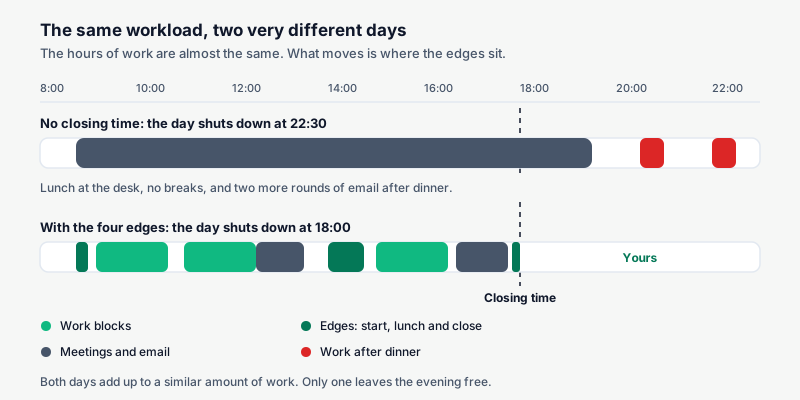
You do not need to redesign the whole day. Four marked moments and the rest falls into place.
| Edge | What it decides | How you notice it is missing |
|---|---|---|
| Fixed start | When the workday begins | You answer messages from bed and at ten you still have not started anything real |
| Movement break | When you leave the chair | You reach lunchtime without having stood up once |
| Lunch away from the desk | How you cut the day in half | You eat in front of the screen and the afternoon drags |
| Fixed close | When the workday ends | You reopen the laptop after dinner several times a week |
Of the four, the close is the one that rules: it sets how long the day is, and everything else lands around it. Close at 18:00 and the afternoon has an end. With no closing time, every task that gets complicated eats into the evening. Pick it first and be realistic: 18:30 kept four days beats 17:30 missed five.
Lunch comes second. Eating at the desk you work at saves ten minutes and flattens the afternoon. Moving to another room for half an hour marks the middle of the day and lets the afternoon start again instead of continuing.
The routine, hour by hour
Here is a reference day for a nine to six schedule. The times are indicative; what matters is the order and the distance between pieces.
| Time | Piece | Length | What it solves |
|---|---|---|---|
| 08:30 | Screen-free start: shower, mobility or a walk outside | 10-20 min | Separates sleeping from working without passing through email |
| 09:00 | Pick one priority for the day | 2 min | Stops the reactive day where whoever writes first decides |
| 09:10 | First deep work block | 90 min | Puts the hard thing where your head still works |
| 10:40 | Movement break, on your feet | 5-10 min | Changes posture and focus before tiredness shows up |
| 11:00 | Second block, meetings or coordination work | 90 min | Groups the interruptible work instead of scattering it |
| 14:00 | Lunch away from the desk | 30-45 min | Actually cuts the day in half |
| 15:00 | Afternoon block, shorter | 60-90 min | Uses the afternoon without expecting morning output |
| 16:30 | Ten-minute walk or a short workout | 10 min | Breaks the second half, the one that stretches most |
| 18:00 | Five-minute close | 5 min | Leaves the day finished on paper instead of in your head |
| 21:30 | Half an hour fully disconnected | 30 min | Puts distance between the workday and sleep |
Two of those need explaining, because they are the ones people skip.
The 90-minute block. There is nothing magic about the number: it is a size that tends to work, long enough to get into something difficult and short enough to hold. If two in a row leave you empty, try 50 minutes with a longer break. What does not work is a four-hour block without standing up; you finish it and pay for it all afternoon.
The five-minute close. When your time arrives, answer three questions in writing: what did I finish today, what is the first thing tomorrow, and what is still open that someone is waiting on. Then shut the laptop. Your head stops rerunning the list at eleven at night because the list is already written down.
If your work is sedentary, the movement part deserves its own detail: it is covered in desk exercises while working. And if the close works but the evening still gets away from you, the next step is a simple night routine.
Breaks that work and breaks that do not
Breaks are the piece most people get wrong. Stopping without standing up or changing screens rests you very little, and it spends the time you had.
| Break | What it does | Verdict |
|---|---|---|
| Standing up and walking around the flat for five minutes | Changes posture and lowers focus without switching it off | Works |
| Looking at your phone in the same chair | Still a screen, still sitting | Does not work |
| Coffee standing in the kitchen, no phone | Short, moves you, ends on its own | Works |
| Reading news or social feeds | Adds information and tension instead of removing it | Does not work |
| Ten minutes outside | Light, movement and a full change of scene | Works |
| Tidying something in the house | Changes the task, but stretches easily | Half: give it a limit |
| An informal call with a teammate | Still work, however pleasant | Does not work as a break |
The rule behind the table: a break counts if it gets you up, moves you somewhere else and takes the screen away. Two out of three is acceptable; none of the three is an interruption under another name. On quantity, one mid-morning, lunch away from the desk and one mid-afternoon cover most days.
Six signs of wear and what to change for each
Wear does not announce itself. It shows up in small things you have been treating as normal for weeks. These six are the easiest to spot, and each has a concrete fix.
| Sign | What is happening | What you change this week |
|---|---|---|
| You reopen the laptop after dinner three days running | There is no close, only a long pause | Set an alarm at closing time and leave the laptop in another room |
| You eat in front of the computer every day | The midday cut is missing | Eat in another room, even if it is twenty minutes |
| Friday arrives and you cannot tell the days apart | Identical days with no markers | Put one different thing in the week: a class, a meal out, an errand |
| Sunday afternoon already feels like Monday | The week starts with no plan and your head tries to cover for it | Fifteen minutes of weekly planning on Friday, not Sunday |
| You keep every work habit and none of your own | Work took the whole day without asking | Drop to two personal habits and protect those first |
| You struggle to sleep after working late | There is no distance between the day and bed | Half an hour with no work screens before sleep |
None of these is serious on its own. The problem is three or four of them together for several weeks, because by then there is no gap left to recover in. If you also plan more than fits, the actual count is in how to tell if your day is overloaded.
What to cut when the week is full
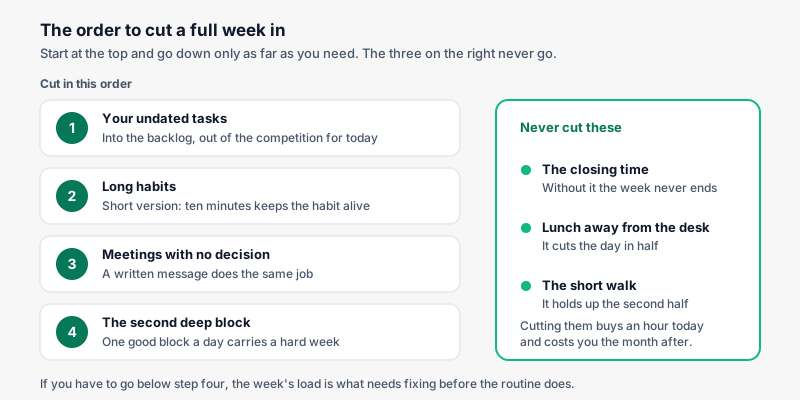
Some weeks the full routine does not fit. That happens several times a year, and what decides how you come out of it is the order you cut in.
| Order | What you cut | Why it goes there |
|---|---|---|
| 1 | Your undated tasks: into the backlog | No owner and no deadline this week, so they should not compete for the day |
| 2 | Long habits, in their short version | Ten minutes keeps the habit; zero breaks it |
| 3 | Meetings with no clear decision | A written message does the same job and frees an hour |
| 4 | The second deep block | One good block a day carries a hard week |
And here is what you do not touch, however tight the week: the closing time, lunch away from the desk, and the short walk. Those three hold up the weeks that come after. Cutting them buys an hour today and costs you the month.
The weekend is not the place to put what did not fit either. Once Saturday becomes the overflow drain, Monday starts worse. A weekly plan with gaps prevents that better than any Sunday marathon; we go into it in how to create a weekly routine.
How Monkway handles it
Monkway does not invent a new method here. It puts the edges into your day and tells you when you stop keeping them. These are the pieces you would use.
- The Avoid burnout path. Four habits, already set up: one deep work block, define one priority for the day, stop working at a fixed time, and thirty minutes of full disconnection. It is close to this article, ready to add.
- The Move while you work path. Six short habits, Monday to Friday, each with a time: mobility before starting, standing up every hour, a neck and back stretch at midday, a walk after lunch, a short desk workout mid-afternoon and a workout after work. Add all six or just two.
- A time and weekdays per habit. Every habit carries its own time and frequency, so "stop working at a fixed time" fires Monday to Friday and disappears at the weekend.
- The day's load. Today shows "Load 6/8": what is scheduled against your maximum, counting habits and tasks dated that day. Send something to a day that is already full and it warns you, and offers to move it to the first day with room.
- Skip today instead of failing. A travel day or a delivery week gets marked as a skip, not a miss. Your monthly completion stays honest and one Tuesday does not cost you the habit.
- 30-day completion instead of streaks. Progress shows the percentage you keep and which weekdays you miss most. If your close collapses every Thursday, you change Thursday rather than the whole routine.
- The backlog. What you want to do but not this week goes in with no date and stops competing for the day. It is the first place to cut from when the week gets tight.
- The weekly review. Once a week it shows overdue tasks, weak habits, stalled paths and an old backlog, with one-tap decisions. Fifteen minutes on Friday beats two hours of rethinking on Sunday.
- Widgets. Today's habits on the home or lock screen, so you can tick them without opening the laptop.
You can see the full guided paths on the paths page, and if you want the reminders to land at the right time, the detail is in how to set habit reminders.
FAQ
What time should I stop working?
Whatever time you can keep four days out of five. A close at 18:30 you respect beats one at 17:30 you always miss, because a closing time you ignore stops working as a signal.
Do I need to get up early to work from home well?
No. What matters is that the start time is roughly the same every day, not that it is early. A steady 9:30 to 18:30 is less tiring than a schedule that drifts two hours a day.
How many breaks should I take?
Three usually covers it: one mid-morning, lunch away from the desk and one mid-afternoon. If you have back-to-back meetings, take two minutes between them just to stand up.
Does a fake commute help?
It works well for a lot of people, because it brings back the three things the real commute did: the signal, the change of place and the gap in between. Ten minutes walking before and after is enough to feel it.
What if my team writes at all hours?
Separate receiving from replying. Mute work notifications outside your hours and agree in writing what counts as genuinely urgent. If remote work is regulated where you are, the disconnection policy is the place to look.
How many personal habits fit in a working day?
Two or three short ones, and always the same ones. On a tight day keep the short ones and drop the long ones: repetition is what holds a habit, not duration.
Is working from home more tiring than the office?
It depends on the day, not the place. With no edges you work longer and rest worse at home; with the four in place there is usually more room left for your own life than a daily commute leaves.
When does this stop being a routine problem?
When the exhaustion survives a well-rested weekend, lasts for weeks, or comes with physical or mood symptoms. At that point it is worth talking to a doctor; a better routine is not the treatment.
Start with the closing time
Pick the time tomorrow's workday ends and set an alarm five minutes before. That single edge changes the rest: the day has an end, and the evening stops being an extension of work.
If you want the routine to hold without you having to remember it, the Avoid burnout path brings the four habits ready to go and the movement path spreads the rest across the day. Monkway is free to start, on iPhone and in the browser.