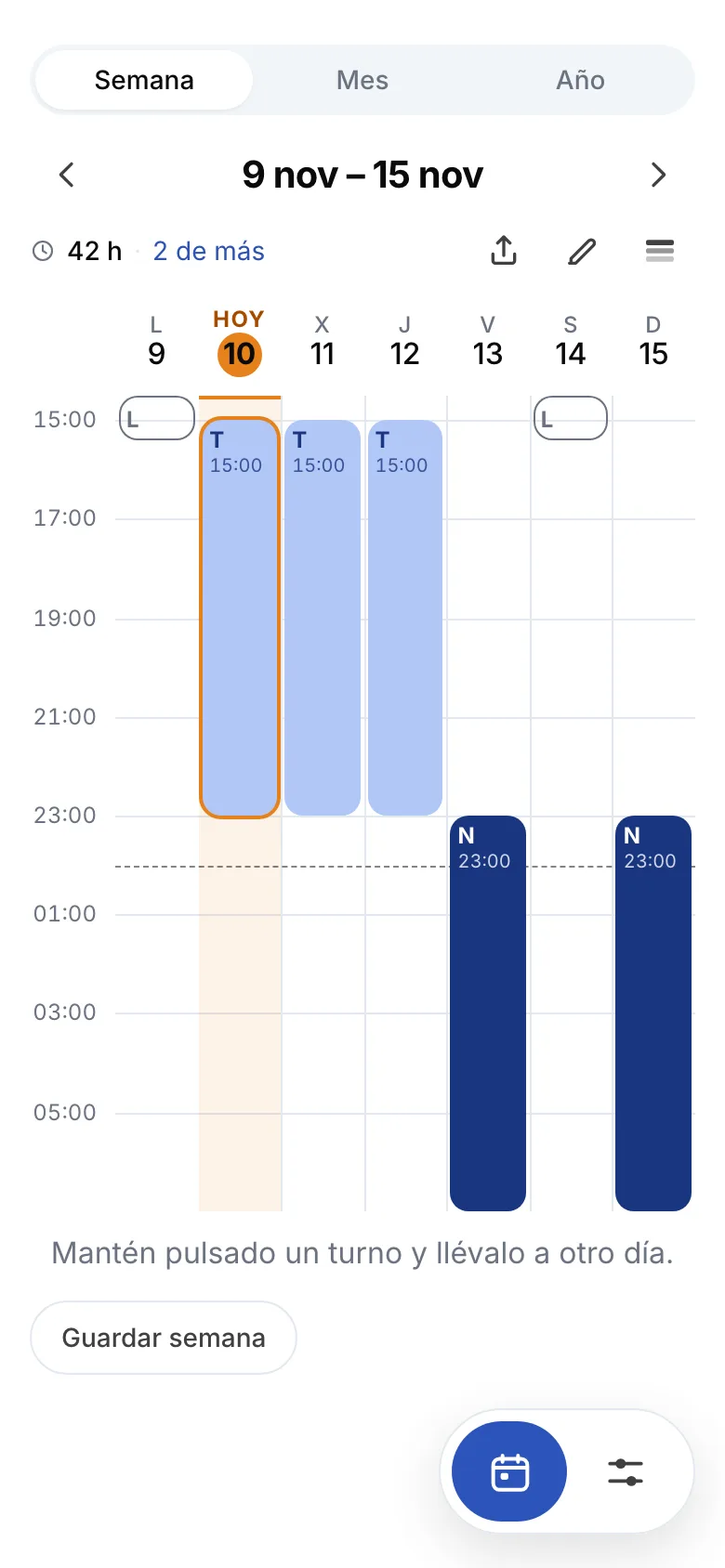
The week, like a school timetable
The screen it opens on. Days in columns, shifts in their own time band, so a split shift or a night that crosses midnight sits where it belongs. At the top, the hours of the week and how far over or under you are.
You set your rotation once and the rota fills itself in, all the way into next year. Seven earlies, seven lates, seven nights and four off; four on and two off; or your own, built shift by shift.
Download on the App StoreiPhone · iOS 15 or later · free, with a one-off in-app purchase
Turnero is an iPhone app that turns a shift rotation into a full rota. You tell it which shifts you work and what your week looks like, and it lays out every other day into next year. It works offline, asks for no account and has no subscription.
It is not a calendar you have to fill in day by day. You describe the pattern once — the shifts with their hours, and what you do on each day of the week — and the app works out the rest: the whole month, the whole year and the home screen widget.
Days that break the pattern are tapped and changed: the shift a colleague swapped with you, the overtime, the doctor at 10:30. The change stays on that day and the rotation stays intact underneath, so you can always go back to it.
| Platform | iPhone (iOS 15 or later) |
|---|---|
| Price | Free. "Turnero completo", €4.99 in Spain, paid once |
| Languages | Spanish and English |
| Account | Not needed: no email, no sign-up |
| Connection | Works entirely offline |
| Ads | None |
| Category | Productivity · rated 4+ |
| Released | 9 November 2026 |
| Made by | Mario Calvo Castillo (Monkway) |
Turnero is for anyone whose week never looks like the last one: rotating shifts, nights, alternate weekends or a rota that changes every month. It is built for the person working the shifts, not for the company handing them out.
If you have two jobs, Turnero keeps both rotas apart and paints them on the same month. That part comes with the purchase.
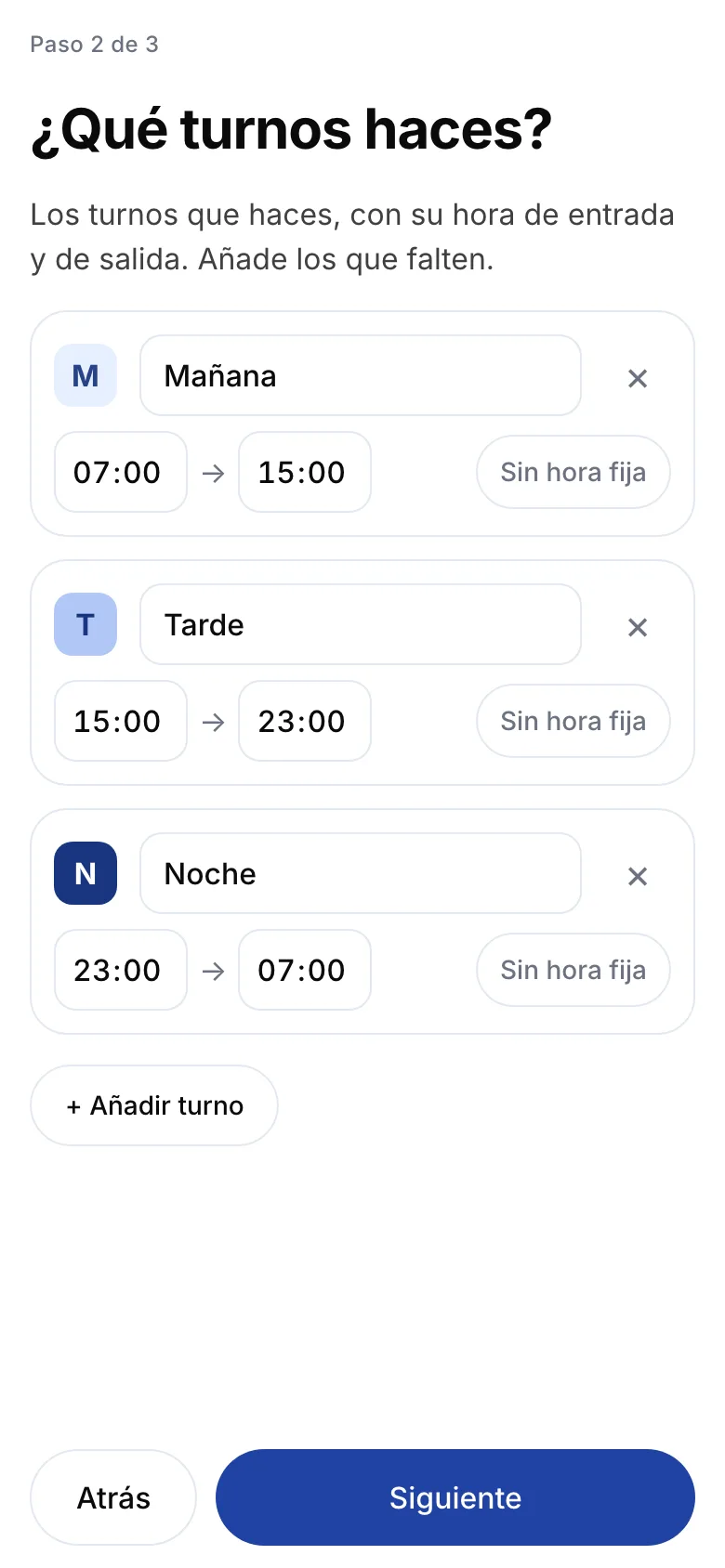
Setup is three questions and you do it once: how many hours you work per week, which shifts you do and when they start and finish, and what your week looks like. After that the rota fills itself in and you only touch the days that change.
The ones in your contract. They are what lets the app tell you, every week and every month, whether you have gone over or come up short.
Early, late, night, off, holiday and sick leave come ready made. Rename them, change the hours, delete the ones you do not work and add the ones missing, split shifts of up to four blocks included.
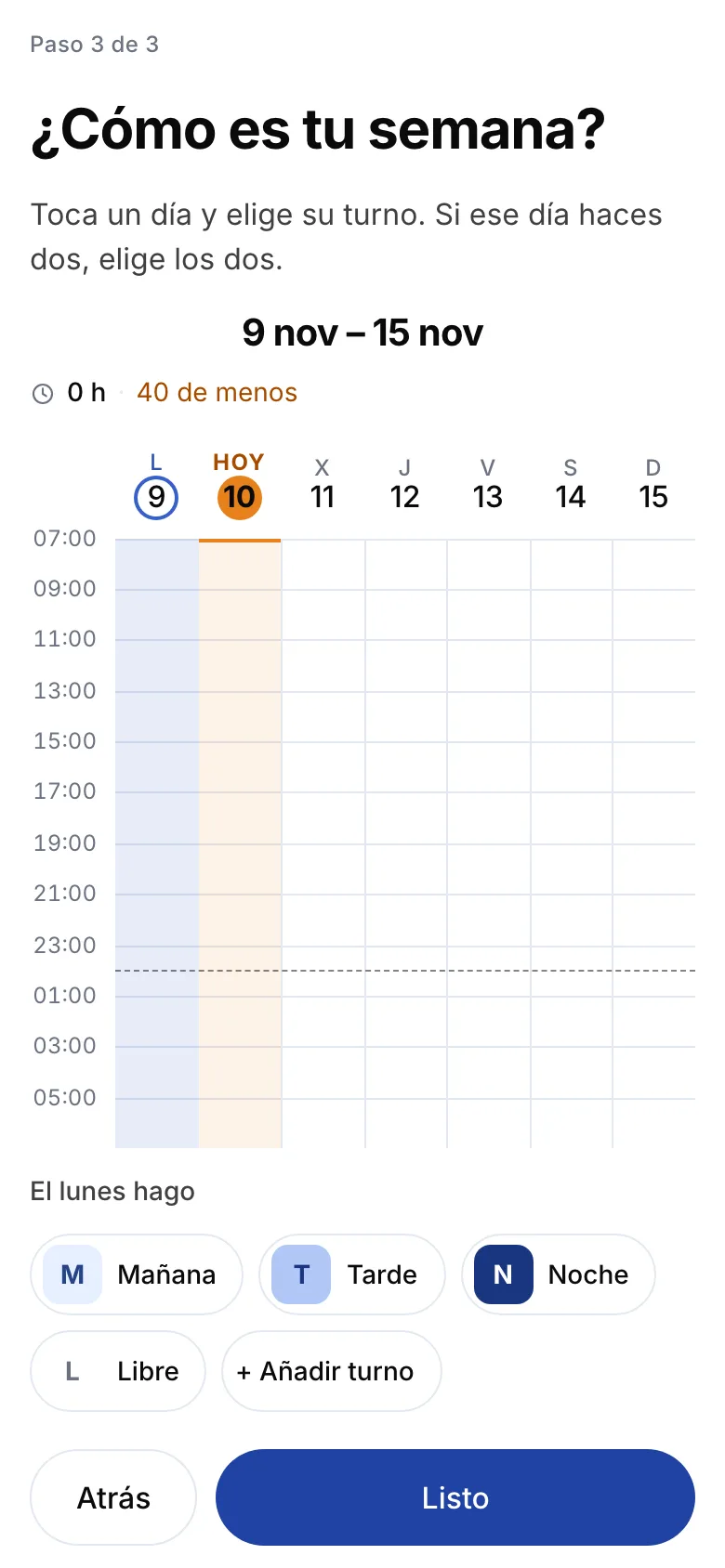
Tap each day and pick its shift. Once the week is set, tell it to repeat and the rest of the year is done.
After setup there are only two gestures: looking — at the week, the month or the year — and tapping a day to change it.
The screen it opens on. Days in columns, shifts in their own time band, so a split shift or a night that crosses midnight sits where it belongs. At the top, the hours of the week and how far over or under you are.
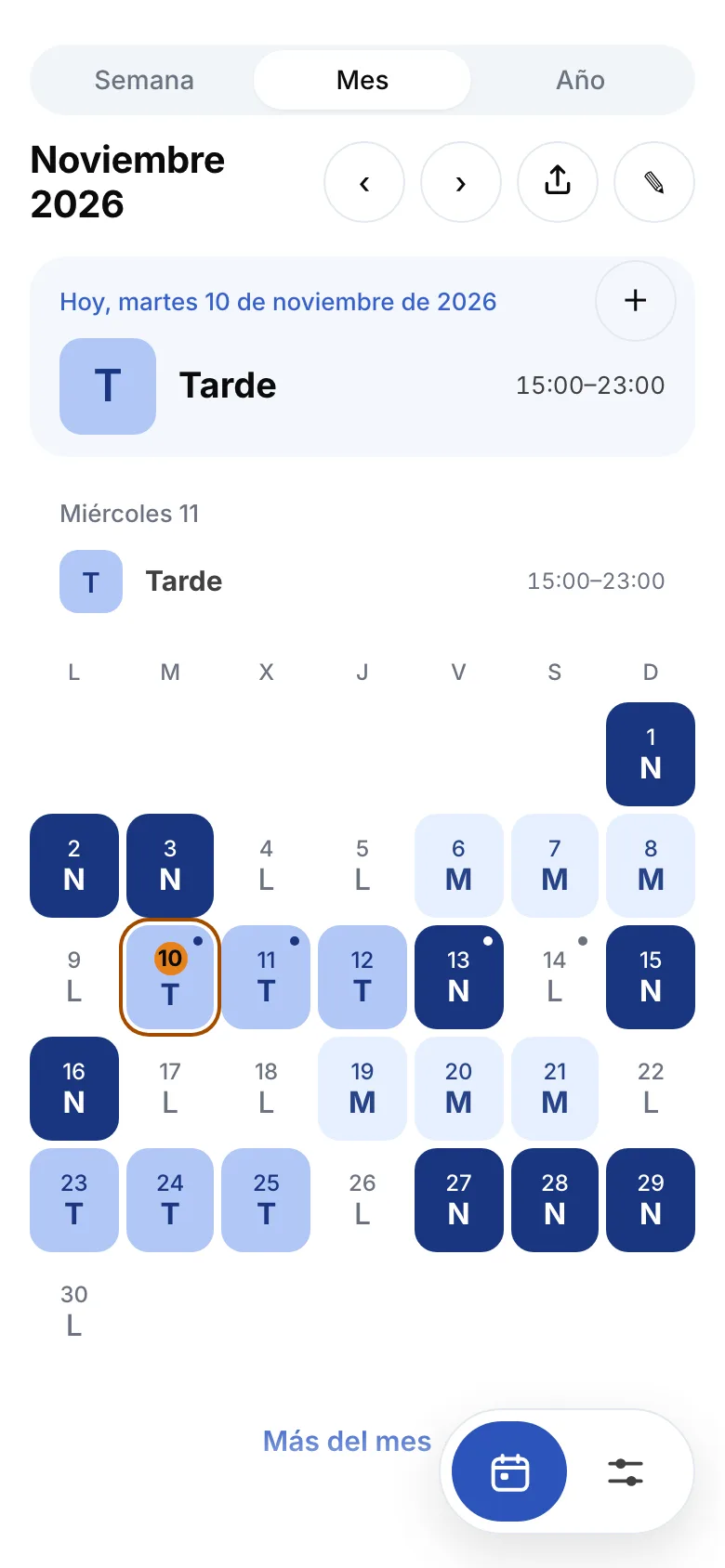
Every shift in its own colour and letter. At the top, today and tomorrow with the times you start and finish, which is the morning question. Days you changed by hand carry a dot.
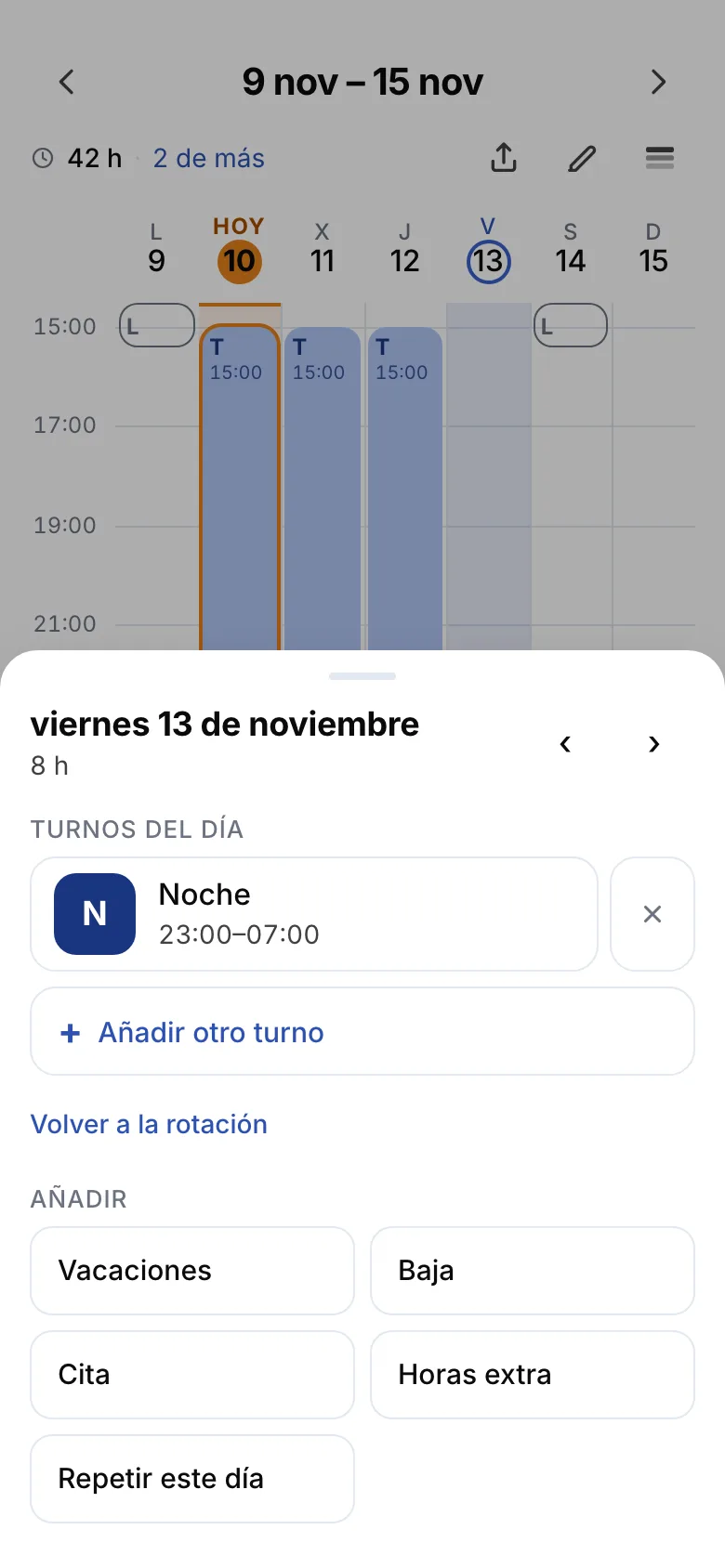
Tap a day and its sheet opens: change the shift, add another one, mark holiday or sick leave, note an appointment or some overtime. "Back to the rotation" undoes the change without touching anything else.
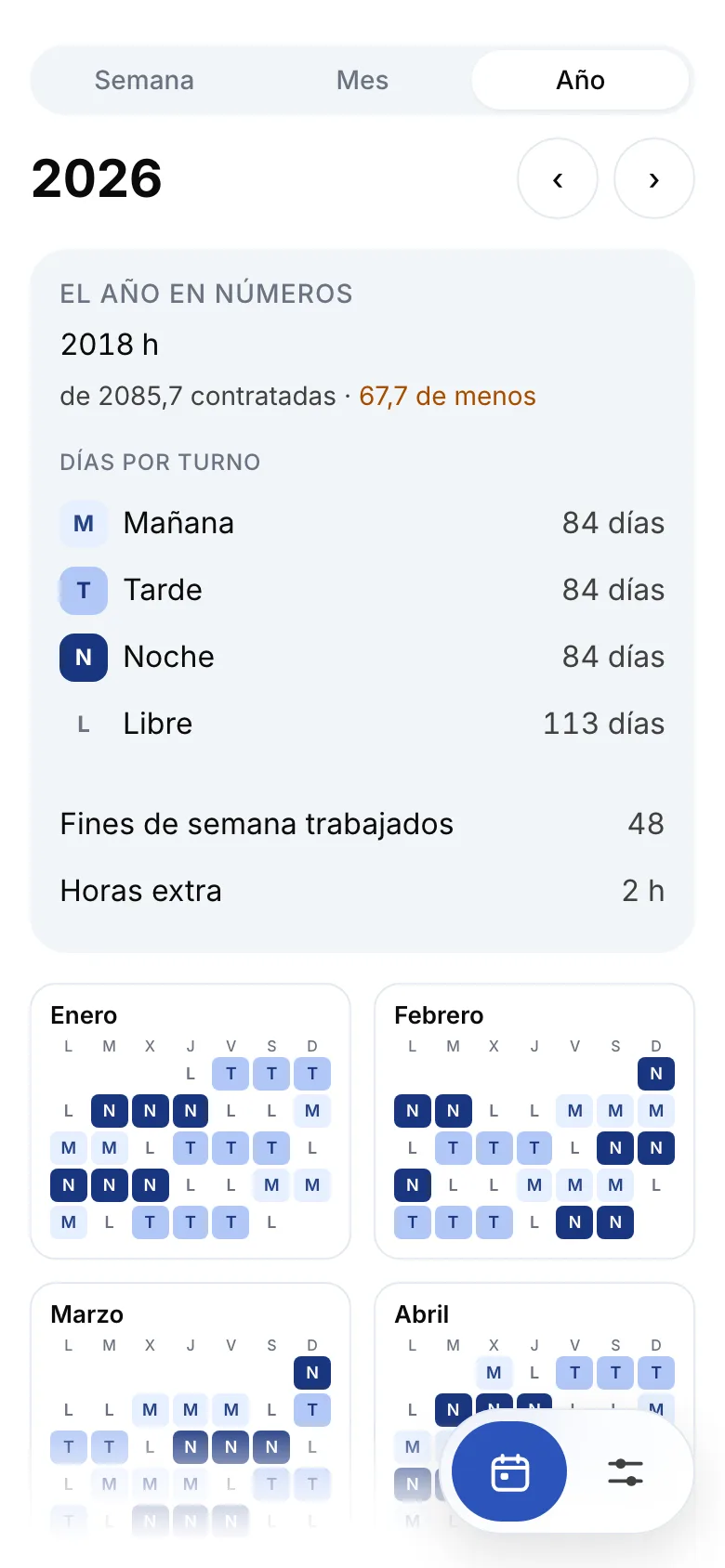
Twelve months, hours worked against hours contracted, how many days of each shift and how many weekends fall inside. This is the screen for booking holiday knowing where it lands.
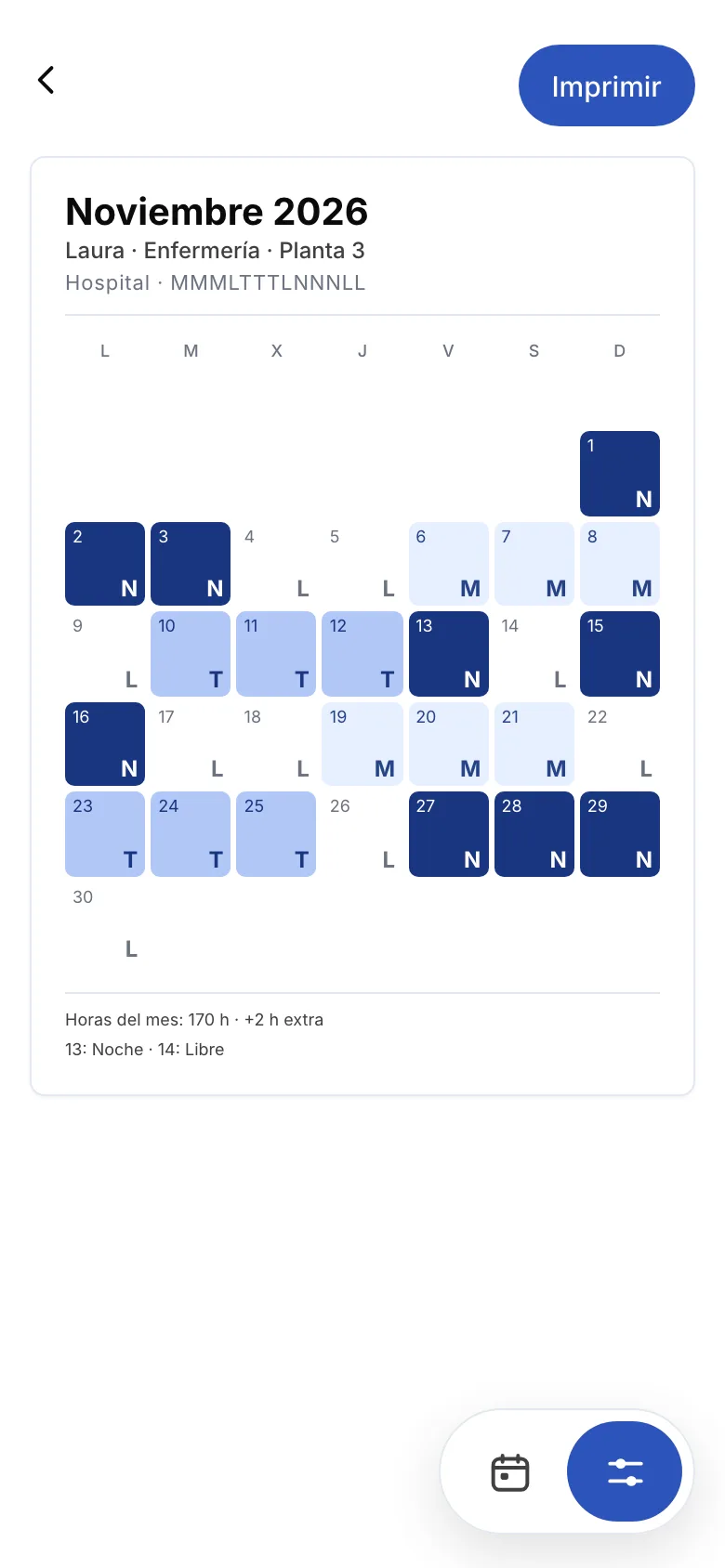
The month on A4 with your name, your job and your place, the hours added up and the days you changed listed underneath. Print it, save it as a PDF or send it on WhatsApp.
On the iPhone home screen there is a widget with the days ahead, so you do not have to open anything.
Turnero is free and what you pay for is paid once, not a subscription: "Turnero completo", €4.99 in Spain. Building the rotation, seeing the week and the month, changing days and using the widget cost nothing and never expire.
That is the Spanish price; elsewhere Apple sets the equivalent. Apple takes the payment, and refunds are requested at reportaproblem.apple.com.
Turnero asks for no account and no email, sends your shifts to no server, and has no ads and no subscription. Your rota lives on the phone and works offline.
The trade-off is honest: delete the app without saving a copy and the rota goes with it. Settings → Your rota gives you one file with everything, to carry to a new phone.
The purchase comes back with "Restore purchase" using the same Apple ID.
An iPhone app for people who work shifts. You describe your rotation once — the shifts with their hours and what your week looks like — and the app fills in the whole month and the whole year. Days that change are tapped and corrected one by one.
Downloading and using it is free. Printing, the whole year, the hours of the month and the second job come with "Turnero completo", which costs €4.99 in Spain and is paid once. There is no subscription.
Not yet. Turnero is only on the App Store, for iPhone with iOS 15 or later. If you want to hear when an Android version exists, write to monkwayapp@gmail.com.
Yes, completely. The rota is worked out and stored on the phone, so it works on the underground, in a basement or in flight mode. The only thing that needs a connection is the purchase, because Apple handles it.
No. Turnero asks for no email, no password and no sign-up. You open it and start. That is also why it cannot get your rota back if you delete the app: save a copy from Settings before changing phones.
Yes, and any other pattern. Nothing is fixed: you lay out your week shift by shift and tell it to repeat. Four-on two-off cycles, alternating early and late weeks or an irregular rota all work the same way.
A day takes up to four blocks with their own hours, so a morning plus an afternoon, or a split shift with an on-call on top, look like what they are. In the week view each block sits in its own time band.
Tap that day and give it the new shift. The change stays on that day only and the rotation stays intact underneath, so "Back to the rotation" undoes it. The same goes for holiday, sick leave, appointments and overtime.
Yes, with "Turnero completo". You get an A4 sheet of the month with your name, your job, the hours added up and the days you changed listed. Print it, save it as a PDF or send it on WhatsApp.
Yes, with "Turnero completo". Each job has its own shifts and its own rotation, and both are painted on the same month, so you can see at a glance whether they clash.
Yes. You can put a widget with the days ahead on the iPhone home screen, so you can see what is next without opening the app. It is included in the free version.
Settings → Your rota → "Save a copy" gives you a file with the rotation, the shifts and everything you wrote down. On the new phone, "Bring a copy". The purchase comes back with "Restore purchase" and the same Apple ID.
Spanish and English, both complete. The app follows the language of your phone.