Quick answer. Ideas you have not committed to yet need a place of their own, separate from today's list and separate from your notes. Write them down in two seconds without picking a date or a category, then decide them all in one sitting once a week: do it today, give it a date, turn it into a habit, or delete it. Dropping them into tomorrow turns them into tasks you keep pushing. Leaving them in phone notes, messages to yourself and scraps of paper turns them into nothing.
In this guide
- Why ideas end up scattered across five places
- What a backlog is and how it differs from today's list
- What belongs in the backlog and what belongs elsewhere
- How to capture in two seconds without deciding anything
- When you decide, and on what criteria
- What to do with what has sat there for months
- How Monkway does it
Why ideas end up scattered across five places
Almost nobody has a memory problem here. The problem is destination. When something occurs to you while you are out walking, you have to pick where it goes before you can write it, and that choice is exactly what you do not want to make at that moment. So it lands wherever is fastest: the notes app, a message to yourself, a screenshot, the pad on the desk.
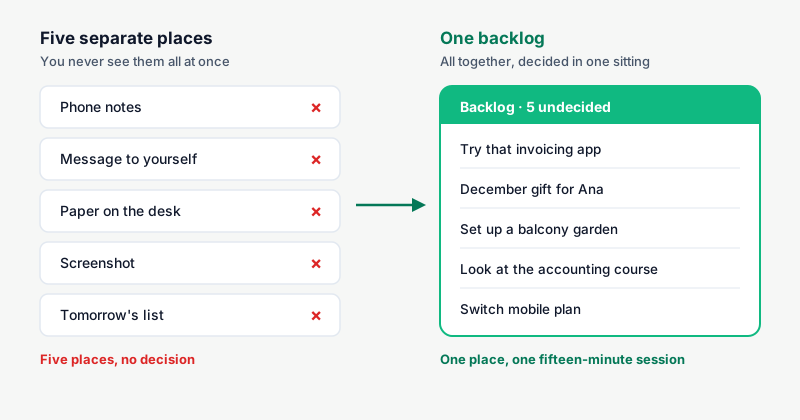
The result is not that you lose ideas. It is that you lose the overview. You have fourteen things written down and at no point do you see all fourteen at once, so you can never compare them or decide which one deserves a slot in your week.
One detail makes it worse. When we store something externally, we tend to remember where we put it better than what we put there: Sparrow, Liu and Wegner documented this in Science in 2011 while studying what happens to memory when information is a click away. With five different places, you do not even keep that trail.
| Where it lands now | Why it lands there | What goes wrong |
|---|---|---|
| Phone notes | It is the fastest thing to hand | It mixes with recipes, passwords and shopping lists |
| Message to yourself | No second app to open | Any conversation buries it within two days |
| Paper on the desk | You had no phone out | It survives until you tidy the desk |
| Screenshot | You saw something and did not want to type | It ends up among 4,000 photos with no text to search |
| Tomorrow's list | It is the only "task" place you have | It fills the day with things you have not decided yet |
That last row is the expensive one. Dropping an undecided idea into tomorrow looks like tidiness, but what it does is push the decision to the next morning, when you have less time and worse judgement. That is where half of the tasks you keep postponing come from.
What a backlog is and how it differs from today's list
A backlog is a list with no dates, no order and no obligation. It does one job: get the idea out of your head without making you decide anything yet. It has no countdown and nothing in it is overdue, because nothing in there was ever promised for today.
The difference from today's list is commitment. What sits in your day is a promise you made to yourself for today. What sits in the backlog is material on hold. Mixing the two ruins the day list, because you stop believing it: once half of what you see there was a loose idea, you start ignoring the parts that mattered too.
| Backlog | Today's list | Notes | |
|---|---|---|---|
| What it is for | Storing without deciding | What you will do today | What you want to remember |
| Has a date | No | Yes, today | No |
| Reviewed | Once a week | Every morning | When you go looking |
| Can be emptied | Yes, by deleting | Only by doing | Never needs to be |
| If it grows | Nothing bad | The day loses credibility | It becomes an archive |
The fourth row is worth reading twice. A backlog with forty entries is exactly what happens when you capture without filtering. A day with forty is a problem, which is why how many tasks to plan per day has a small answer and the backlog has none.
There is a third category many people file in the same place and should not: notes. A note is information you want to hand (the name of a wine, what the doctor told you, a gift idea for December). A backlog entry is something you might do. The test is simple: if the line starts with a verb, it goes to the backlog; if it is a fact, it goes to notes.
What belongs in the backlog and what belongs elsewhere
Almost everything you jot down fits one of five destinations. Working out which one takes under three seconds once you have the table in your head.
| What you just wrote | Where it goes | Why |
|---|---|---|
| "Try that invoicing app" | Backlog | Maybe yes, maybe no, and no rush |
| "Call the dentist tomorrow" | Today's list, with a date | Already decided and it has a moment |
| "Read more" | Backlog, and rewrite it | With no concrete verb there is nothing to start |
| "Go to the gym three times a week" | A habit | It repeats, it is not a one-off errand |
| "That Ribeiro wine I liked" | Notes | It is a fact, not something to do |
| "Set up a balcony vegetable garden" | Backlog | It is a project dressed as an idea |
| "Change the tyre before the trip" | Today's list, with a date | It has a real deadline |
The two backlog rows that repeat most start with "try" and with "set up". The "try" ones are cheap and usually resolve in ten minutes when their turn comes. The "set up" ones are rarely a task at all: they are a goal with several moving parts, and they work better split up the way how to break a long goal into habits describes.
What should never go to the backlog is anything with an external deadline. A car inspection, a tax filing or a birthday do not accept "I will decide later": they go straight to their day. The backlog is only for what depends on you and nobody else.
How to capture in two seconds without deciding anything
The rule is that capturing has to cost less than not capturing. If your system asks for a folder, a tag and a date before it saves, you will keep using the message to yourself, and you will be right to.
- One single entry point. One field, always the same one, always behind the same button. If there are two possible places, you are back to the original problem.
- Write the whole sentence, with a verb. "Invoices" will tell you nothing in three weeks. "Try the invoicing app Ana mentioned" will.
- No required fields. No picking an area, a priority or a date at capture time. That gets decided later, when you are sitting down.
- Do not sort it. Reordering the backlog is the most comfortable way to feel productive without deciding anything.
- Give it three seconds of context if you have them. "Try X (Ana mentioned it, for the quarterly invoices)" decides itself on Sunday. With no context, you have to reconstruct it.
Point five has a catch. Writing something down does help you stop turning it over, but it helps considerably more when the note includes when or how you will do it. Masicampo and Baumeister showed this in 2011: making a concrete plan cuts the intrusiveness of unfinished goals, while simply thinking about the task does not. Applied to your backlog: capturing lifts the weight halfway, and the weekly deciding session lifts the rest.
When you decide, and on what criteria
Once a week, fifteen minutes. Sunday afternoon or Friday at the end of the day, whichever fits. What matters is that it is a fixed moment, because a backlog that never gets opened turns into a graveyard and stops being useful even for capturing.
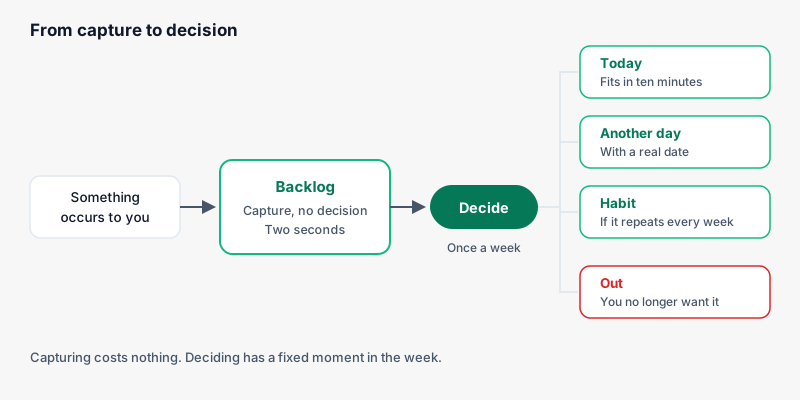
Four destinations, one decision per entry, no going back.
| When you reread it you think… | It goes to | What you get |
|---|---|---|
| "That is ten minutes" | Today, straight away | It is gone before you think about it again |
| "Yes, but not this week" | A specific date | It stops weighing and shows up when due |
| "I would do this every week" | A habit | It comes back on its own, undecided no more |
| "Honestly, no" | Out | You get the attention and the slot back |
Two criteria save a lot of time. First: if you hesitate for more than twenty seconds, the answer is "out" or "leave it". Nothing that needs a two-minute analysis is a loose idea; it is a project, and projects get planned separately. Second: if rereading it makes you think "I should" rather than "I want to", it usually belongs to an earlier version of your life and can go.
Do not decide more than five or six per session. Iyengar and Lepper showed in 2000 that widening the number of options lowers both the chance of choosing and the satisfaction with the choice. A whole backlog at once produces exactly that: you leave it for another day and decide none of it. Five decided and the rest untouched is a good Sunday.
And when you place what survives, put it on days that actually have room. If Tuesday is already full, the idea does not go on Tuesday. It fits well as the last step of whatever weekly planning you already do.
What to do with what has sat there for months
Some of what you capture is there to die quietly, and that is fine: writing it down was cheaper than arguing with yourself in the street.
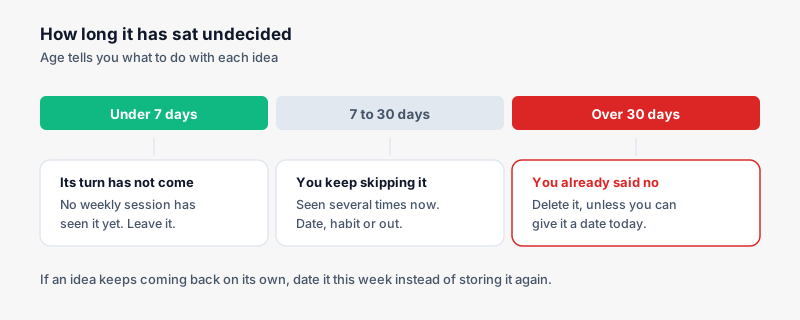
Age is the best signal you have, and it costs nothing to look at.
| Time undecided | What it usually means | What to do |
|---|---|---|
| Under 7 days | It has not had its turn yet | Nothing. Wait for the weekly session |
| 7 to 30 days | You have seen it and skipped it several times | Decide now: date, habit or out |
| Over 30 days | You already decided without writing it down | Delete it, unless you can date it today |
| Over 90 days | It belonged to a different stretch of your life | Out, without rereading the whole thing |
| It keeps coming back | It genuinely matters | Give it a date this week, do not store it again |
That last row is what saves the good ideas. If something occurs to you three times in two months, it does not need more resting time: it needs a slot. And if rereading it tells you that you would do it every week, it is no longer a loose idea but an unnamed habit; the mechanics are in how to track habits.
Deleting is less frightening than it looks. The ideas that mattered come back on their own, usually within a month. The ones that never come back were noise, and keeping them stored only made every review slower.
How Monkway does it
Monkway treats the backlog as its own piece, next to Today, rather than mixing it into the day's tasks.
- It is called Backlog and you capture from any screen. The field says "Jot something down…" and saves on Enter. It asks for no date, no area, no priority. The New button also has "To backlog".
- The undecided count is visible. The Backlog screen shows "12 undecided", and Progress shows the same number under "Backlog · undecided". That is the number that tells you whether the weekly session has got away from you.
- Deciding is two taps. You press Decide and choose under "Do" (Today, Tomorrow, This weekend, Pick a day…) or under "Turn into a habit" (Every day, 3 times a week, Customize…). That is the whole decision.
- On desktop you drag it onto the day. Take the backlog entry and drop it on Today if you are doing it now.
- You can see what you decided. Below it, "Decided this week" lists each one with its destination: → Habit, → Task or → Done. It is how you check the backlog is moving instead of growing.
- The weekly review pulls out the old stuff. Weekly review has a section called "Old backlog" with the rule "Over 30 days undecided", and every entry offers Today, Keep or Delete. That is the cleanup from the table above, already done for you.
- Filters come later, not at capture. Area and Priority (High, Medium, Low) live on the Backlog screen for when you decide, not for when you type.
- Every journey has its own backlog. If the idea belongs to a long endeavour, you capture it inside that journey with "Jot something down for this journey…" and it stays out of the main pile.
- Notes are separate. What you want to remember rather than do lives in Notes, so the Backlog holds only things that start with a verb.
The principle underneath is that capturing should cost nothing and deciding should have a moment. Once those two are separated, opening the backlog stops being unpleasant.
Frequently asked questions
What is the difference between a backlog and a to-do list?
A to-do list assumes you are going to do everything in it. A backlog holds things you have not decided yet, so it can grow without that meaning you are behind.
How many ideas can a backlog hold before it becomes useless?
There is no maximum as long as you review it weekly and delete the old entries. If a review takes you more than fifteen minutes, the problem is that you are not deleting, not that you captured too much.
What if I write something down and later cannot tell what I meant?
Delete it. Reconstructing a note costs more than having the idea again if it was any good. Next time, add three words of context as you write it.
Do I have to categorise ideas?
Not at capture time. Sorting before you decide is work that usually gets thrown away, because many of those entries will be deleted at the first review.
When should a backlog idea become a habit?
When rereading it tells you that you would do it every week rather than once. As a habit it stops demanding a fresh decision every Sunday, and you can watch consistency instead of a list.
What if opening the backlog makes me anxious?
Open it only during the weekly session, and start by deleting anything over thirty days old without reading it through. Seeing it daily does not help, because it is material on hold and not today's work.
Can one backlog hold both work and personal ideas?
Yes, provided you can filter by area when you decide. Keeping two backlogs forces you to choose one before capturing, which is exactly the friction this system removes.
Start by emptying the five places
Take fifteen minutes and gather into one list whatever sits in your notes, your messages to yourself and your scraps of paper. Twenty to forty things is normal, and about half can be deleted the moment you see them side by side. That is already your backlog.
If you want capturing and deciding to happen in the same place, and anything over thirty days old to be surfaced for you, Monkway is free to start, on iPhone and in the browser. And if what comes out of your backlog is long goals rather than loose tasks, the next step is the guided journeys.