Quick answer. When you come back to a habit app after months away, do not try to catch up on everything at once. First protect what you had: mark the gap as a break so your streaks do not reset. Then keep only one or two habits active and pause the rest, without deleting anything. Overdue tasks and your backlog can wait for a short review at the end of your first week back.
What you'll find
- Why opening the app again feels so hard
- What to do in the first five minutes
- Which habits to keep and which to pause
- What to do about broken streaks
- What to do with overdue tasks and a full backlog
- How to plan your first week back
- When to start fresh instead of picking up
- How Monkway handles it
Why opening the app again feels so hard
Because the app shows you what you did not do. You open today's screen and see every habit you set up at your most motivated. You see streaks at zero, tasks overdue by months and a backlog full of ideas you no longer remember. Within ten seconds you are looking at a list of failures. Most people close the app again.
For a lot of people, the hard part is not doing the habits again. It is facing the app. So the first goal is tiny: make today's screen stop looking like a failed exam.
There is some good news that few people know about. In the habit formation study by Lally and colleagues, published in 2010 in the European Journal of Social Psychology, missing one opportunity did not materially affect the habit formation process. A few months away is more than one missed day, of course. But what you built does not vanish completely, and coming back is not the same as starting from nothing.
| What you see when you return | What it feels like | What it actually means |
|---|---|---|
| Streaks at zero | All that work was lost | The app counted days you were not around |
| Ten active habits | You have ten things to do today | You had ten when you were on a roll |
| Tasks overdue by months | You are hopelessly behind | Many of them no longer matter |
| A backlog with dozens of ideas | You have loads left to do | You wrote down a lot and decided little |
| Reminders you ignore | You lack discipline | They are set for hours that no longer fit |
What to do in the first five minutes
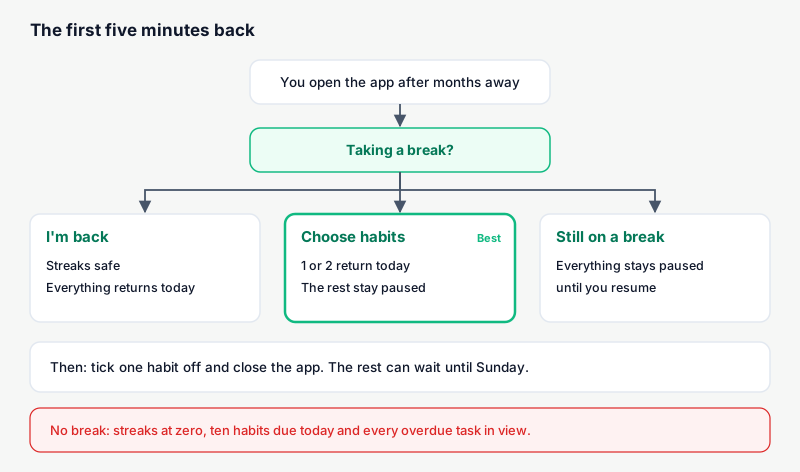
The first few minutes decide whether you stay or close the app again. You are not planning anything yet. You are just making room. Go in this order:
- Mark the gap as a break. If your app supports it, tell it you were away. Your streaks stay where they were and the missing days do not count as failures.
- Pause every habit except one or two. Pause, do not delete. Paused habits keep their history.
- Tick one off today. The easiest one. If it takes two minutes, even better.
- Do not open your overdue tasks yet. They get their own moment later.
- Close the app. You are back. More tomorrow.
Step 5 sounds like a joke, and it is not. If you try to sort everything in your first session, coming back turns into a whole evening. The next time you think about opening the app, you will remember that evening.
Which habits to keep and which to pause
Keep the habit that costs you least and that you miss most. Just one or two. Everything else goes on pause. If you are torn between two, pick the one that takes less time.
Pausing has a clear advantage over deleting. The habit stays there, with its history and settings. Once the first one runs on its own, you resume the next. If you delete it, you have to set it up again and you lose your track record.
| Habit | Keep it active if… | Pause it if… |
|---|---|---|
| One you did almost without thinking | It takes under five minutes | It relies on a schedule you no longer have |
| One that made you feel good | You genuinely miss it | You added it because you "should" |
| One with many days a week | You can drop it to two or three days | It demands every single day |
| One tied to a goal you dropped | Never | Always, or delete it |
| A new one you never really started | Never in the first week | Always |
If you had a lot of habits, do not feel bad about pausing most of them. Often you drifted away precisely because you had too many. There is a guide on how many habits to start at once that works for restarting just as well as for starting.
A useful trick when you resume: lower the frequency. If you used to walk every day, come back with three days a week and no fixed time. After two weeks of sticking to it, raise it if you want.
What to do about broken streaks
There are two cases. If your app lets you mark the time away as a break, do it and the streak stays as it was. If it does not, the streak starts from zero, and that is fine.
A streak at zero has an odd effect. It makes you feel that nothing before it counted. That is not true. The days you did the habit are still in your history. What broke is the counter, not what you learned.
A few things that help with a lost streak:
- Look at the history, not the counter. How many days you did the habit in total says more than how many in a row.
- Do not chase your old streak. Aiming for 90 days again from your first day back asks too much of you.
- Use "skip today" when it applies. If you cannot do it one day, skipping on purpose is different from missing it. In many apps it does not break the streak.
There are more ideas on keeping streaks from making you quit in a streak tracker that doesn't make you quit.
What to do with overdue tasks and a full backlog
This is the heaviest part. After months away, dozens of overdue tasks and a backlog full of undecided items are normal. If you try to deal with them on day one, coming back takes forever.
Age is the rule. Anything that went overdue more than a month ago almost certainly no longer matters, or you already sorted it some other way. Recent items, on the other hand, may still be alive.
| What you find | If it's over a month old | If it's recent |
|---|---|---|
| Overdue task with a real deadline | Check if it's still needed; if not, delete | Put it on a day this week |
| Overdue task you set yourself | Delete, or backlog it if you still want it | Backlog it and decide at the weekend |
| Idea in the backlog | Delete without much thought | Keep until the review |
| Something that repeated every week | Turn it into a habit, paused | Turn it into a habit, paused |
| Something someone asked you for | Ask if it's still needed | Do it or say you won't |
Do it in one sitting, at the end of the first week, not on day one. If there are loads of them, there is a more detailed method in what to do with a pile of overdue tasks.
Watch out for a common mistake: moving everything overdue to tomorrow. Tomorrow you will have fifteen things, you will do three, and the feeling of being behind comes straight back. Cap what fits in one day and spread the rest.
How to plan your first week back
The first week has one goal: make opening the app feel normal again.
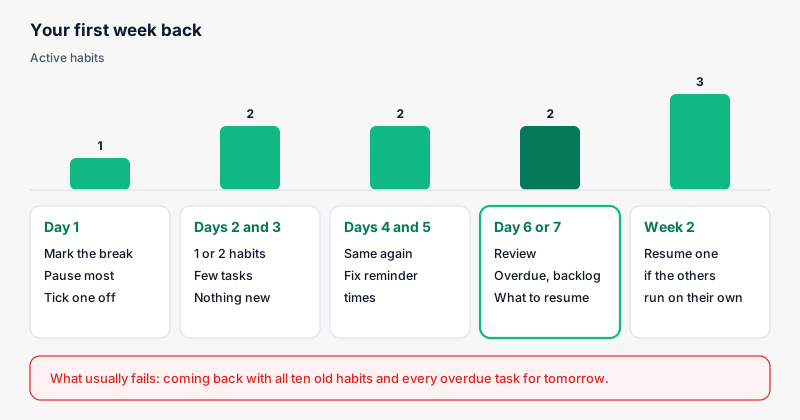
| Day | What you do | What you hold off on |
|---|---|---|
| Day 1 | Break, pause almost everything, tick one habit | Looking at overdue tasks or the backlog |
| Days 2 and 3 | One or two habits, few new tasks | Resuming paused habits |
| Days 4 and 5 | Same again, and fix your reminder times | Adding new habits |
| Day 6 or 7 | Review: overdue tasks, backlog, what to resume | Resuming more than one at once |
| Week 2 | Resume one habit if the others run on their own | Going back to your full old list |
Reminders deserve a minute of their own. If you used to have one at 7 a.m. and now you get up at 8, you will ignore it and feel bad every day. Move it to a time that fits your life now, or switch it off for the first week. There is a guide on how to set habit reminders if you want to tune them properly.
It helps a lot to decide in advance when you will do the habit you keep. Gollwitzer showed that "when X happens, I will do Y" plans help turn intentions into action. For example: "when I pour my first coffee, I open the app and tick the habit."
When to start fresh instead of picking up
Sometimes what you had no longer fits your life. You changed jobs, cities or priorities. Then there is nothing to pick up, and forcing it makes things worse.
Dai, Milkman and Riis described what they called the fresh start effect in Management Science in 2014: people engage more with their goals after dates that mark a before and after, like a Monday or the start of a month. Coming back to the app can be one of those moments. Use it to decide calmly what you want to carry now.
| Sign | What it means | What to do |
|---|---|---|
| Most habits no longer mean anything to you | Your life has changed | Pause or delete, and start with one new habit |
| You like the habits but not the schedule | Your routine changed, not your motivation | Adjust days and times instead of deleting |
| A path or goal no longer matters | It is not your goal anymore | Archive it without guilt |
| Only the streaks and overdue items weigh on you | The problem is the mess | Break, pause and review: no need to start over |
| You left because you had too much | Overload | Come back with half or less |
Starting fresh does not have to mean deleting your account. You can pause the habits you do not want right now and archive the paths you no longer follow. If you are not sure what to cut, there are concrete criteria in how to decide which habit to drop.
How Monkway handles it
Monkway has a prompt built for exactly this moment. It covers the return without you having to change anything by hand.
- It asks when you open the app. If you have gone three days or more without ticking anything, the Today screen shows "Taking a break?" with how many days you have been away. Below, it says your streaks can stay as they were.
- "I'm back" protects your streaks. The days you were away are stored as a pause. They do not count as missed, and your streaks pick up where you left them. The app confirms with "Streaks safe".
- "Choose habits" splits what returns from what doesn't. You tick the ones that stay on a break. Those stay paused until you resume them. The rest come back today.
- The Today banner keeps you posted. While you have habits on a break, you see how many there are and a "Resume" button to bring them back whenever you like.
- Idle habits get asked about one by one. If a habit has gone seven scheduled days without being done, Monkway asks what to do with it: "Pause", "Make it easier" or "Keep going".
- The Weekly review sorts out the pile. It has sections for "Overdue tasks", "Weak habits", "Stalled journeys" and "Old backlog". Each item can be moved to today, kept, paused or deleted in one tap.
- The daily cap stops the binge. In Progress → Pace you set "Maximum things per day". If you schedule something on a day that is already full, the app warns you and offers to move it.
If your app has nothing like this, you can do the same by hand: pause your habits, note the date you came back and do the review on Sunday. The order matters more than the tool.
Frequently asked questions
Do I lose my streaks if I haven't opened the app in months?
It depends on the app. In some, the streak simply resets. In Monkway, if you answer "I'm back" to the break prompt, the days away are stored as a pause and your streak stays where it was.
Is it better to delete the app and start with a new one?
Almost never. You would lose your history and settings, and the mess would return within weeks. Pausing almost everything and coming back with one or two habits usually works better than switching tools.
How many habits should I come back with?
One or two. Even if you used to track ten, the first week is about getting used to opening the app again. Resume the next one when the first ones happen without effort.
What do I do with hundreds of overdue tasks?
Treat anything more than a month overdue as dead, unless it has a real deadline, like paperwork. Send recent items to the backlog or to a specific day this week. Do this at the end of your first week, not on day one.
Do I need to set up my reminders again?
Check them, yes. If they are set for times that no longer fit your life, you will ignore them. Change them or turn them off for the first week, then set them again once you have a fixed time.
What if I come back and quit again after three days?
It happens now and then. Do the same thing again: break, one habit and nothing else. If it keeps happening, you probably have too many habits active or at times that do not suit you.
When does it make sense to start fresh?
When the habits you had no longer fit your current life. If you still care about them and only the mess weighs on you, pausing and sorting is enough. Starting fresh does not require deleting: you can pause what you do not want right now.
What is the difference between pausing and deleting a habit?
Pausing is for something you might pick up again: it stays in your paused list, with its history, and you resume it in one tap. Deleting is for things you are sure you will not do again. If in doubt, pause.
Come back small
Today it is enough to open the app, mark the break, keep one or two habits and close it. The rest can wait for the weekend review. If what worries you is a specific habit rather than the app, that is covered in how to restart a habit you dropped.
If you want an app that asks how you are coming back instead of showing you everything in red, Monkway is free to start, on iPhone and in your browser.