Quick answer. To stop using WhatsApp as your to-do list you need two things: a way to clear what is already there, and a place to write things down that is as fast as texting yourself. Clear the chat with yourself in one twenty-minute sitting, sending each message to where it belongs: a dated task, a backlog of undecided items, a note, or the bin. Then change the habit: when something comes to mind, jot it into a backlog that asks for no date and no category. WhatsApp stays useful for talking to people, but it never puts anything on the right day, never lets you tick anything off, and buries what matters under every new conversation.
What you'll find
- Why you end up texting yourself
- What breaks when WhatsApp is your task list
- Where each kind of message to yourself belongs
- How to clear the chat you already have in twenty minutes
- How to swap the habit without losing speed
- What to do with what other people ask you on WhatsApp
- How Monkway handles it
Why you end up texting yourself
Because it is the fastest thing you have. WhatsApp is almost always open. The keyboard is already there. Typing and sending are two moves you make dozens of times a day without thinking. No task app makes it that easy at the exact moment something pops into your head.
WhatsApp also lets you open a chat with yourself, and plenty of people pin it to the top. Others use a group where they are the only member. The result is the same: one place where everything lands when you do not know where else to put it.
The habit makes sense. The trouble starts later, when you want to find something or decide what to do with it. That chat is great as a way in and poor as a way out.
What breaks when WhatsApp is your task list
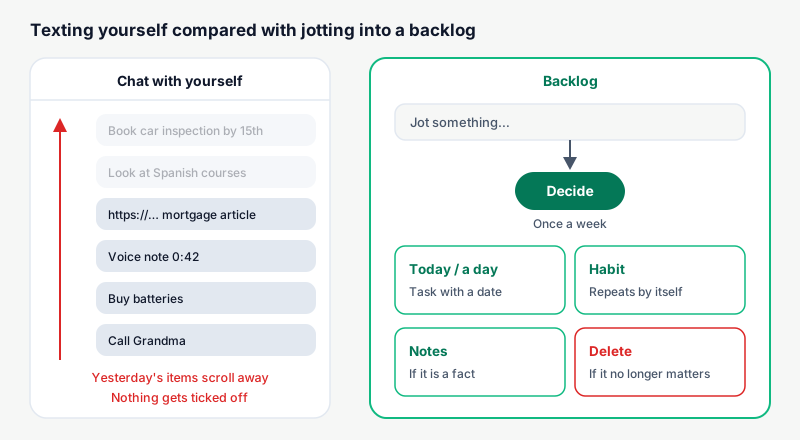
A chat is built for conversation. Everything you write is sorted by when you sent it, and it scrolls up as new messages arrive. A task list needs the opposite: open items stay in view until you close them.
| What you need from a list | WhatsApp chat with yourself | A list with a backlog |
|---|---|---|
| Tick something off | Not possible; at best you delete it | Yes, and it leaves the open items |
| Show up on the right day | No, unless you remember to look | Yes, in that day's list |
| See only what is left | No; done and open are mixed | Yes, finished items move aside |
| Keep ideas apart from dated jobs | No; everything is one more message | Yes: backlog on one side, days on the other |
| Find something from a month ago | Only if you recall the exact word | It is in its place or in the backlog |
| Review what is getting old | No way to see items by age | Yes, in a weekly review |
The first row hurts most. If you cannot tick things off, you never know what is left. You reread messages you already dealt with. In the end you stop trusting the chat and go back to carrying it all in your head.
There is a quieter effect too. Sparrow, Liu and Wegner reported in Science in 2011 that when we expect information to be stored somewhere, we remember where it is better than what it says. With WhatsApp, that "where" is a chat with hundreds of messages. You know you wrote it down, but not what it was or when.
Where each kind of message to yourself belongs
If you scroll through your chat with yourself, nearly everything fits one of six types. Each has a better home, and none of those homes is WhatsApp.
| What you sent yourself | Example | Where it goes |
|---|---|---|
| Something to do by a date | "Book the car inspection before the 15th" | A task on that day |
| Something you might do | "Look at online Spanish courses" | Backlog, no date |
| Something you'd do every week | "Call Grandma on Sundays" | Habit |
| A fact you want to keep | "Lucy's shoe size: 13" | Notes |
| A link to read later | An article or a video | Backlog, with a verb first: "Read…" |
| Something that no longer matters | "Buy batteries" from two months ago | Delete |
Two short rules make sorting fast. If the line starts with a verb, it is something to do: a task, a backlog item or a habit. If it is a fact, it goes to notes. And if it has a date you do not control, like a deadline, an appointment or a birthday, it goes straight onto its day and never into the backlog.
Links need a specific fix. On WhatsApp they look tidy because of the preview, which makes them feel saved. But a link without a verb does not tell you what you meant to do. Write it as an action: "Read the mortgage article" or "Watch the back-stretch video". If you do not feel like it at the weekly review, delete it and move on.
Voice notes to yourself are the hardest case. You cannot search them and almost nobody listens to them again. While clearing the chat, play each one once, write a single line saying what it was about, and delete it.
How to clear the chat you already have in twenty minutes
You do not need to read all of it. You need one sitting with clear rules and a time limit. If you try to process every message calmly, you will stop halfway and the chat will stay as it was.
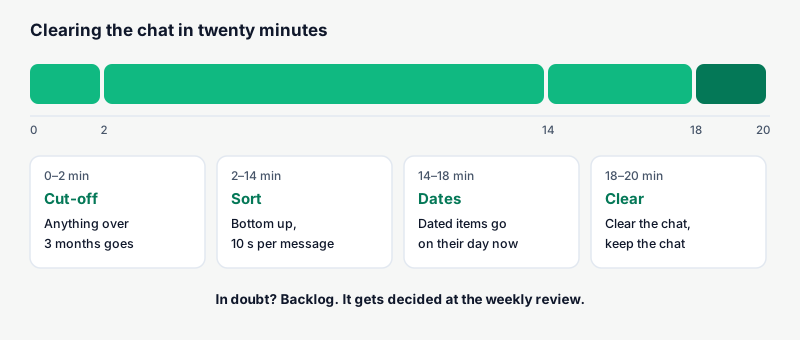
- Set an age cut-off. Anything older than three months counts as dead. If it mattered, you would have done it by now or it would have come back to you.
- Work from the bottom up. Start with the most recent message. That is the one most likely to still be alive.
- One destination per message, ten seconds max. Use the table above. If in doubt, it goes to the backlog. The backlog exists for exactly the things you have not decided yet.
- Dated items go on their day right away. If an appointment or a deadline falls this week, put it on its day now, before you carry on.
- When you finish, clear the chat. WhatsApp lets you clear a chat's messages without deleting the chat. It stays in place, but what was inside no longer weighs on you.
Step 5 is the one most people skip. If the chat is still full, the next time something comes to mind you will go back there, because it is "where your stuff lives".
| Sign while clearing | What it means | What to do |
|---|---|---|
| The same job shows up three times | You keep putting it off | Give it a date this week or delete it |
| You cannot recall why you sent it | It lacks context | Delete; if it mattered, it will come back |
| More than ten items have a date | You had real jobs going missing | Spread them over several days, not all tomorrow |
| Lots of unread links | Saving feels like progress | Keep three and delete the rest |
| Items that repeat every week | Habits without a name | Turn them into habits |
The third row needs care. When clearing, it is easy to end up with fifteen tasks for tomorrow. That turns a tidy-up into an impossible day. Read how many tasks to plan per day and spread the rest across the week.
How to swap the habit without losing speed
This is where most attempts fail. You download a task app, use it for two days and drift back to WhatsApp. Usually the reason is simple: writing in the new app takes more steps.
The rule is plain: the new place has to be as fast as texting yourself. That means one field, with no required date, category or priority. You type, press Enter and carry on.
| Step | Texting yourself on WhatsApp | Jotting into a backlog | Creating a full task |
|---|---|---|---|
| Open | Usually already open | Icon in the same spot every time | Icon and a task screen |
| Pick where | The pinned chat | Always the same field | A list or a project |
| Fill in | Just the text | Just the text | Text, date, priority |
| Decide | Never | Once a week | Right then, in a hurry |
The last row explains why a backlog works as a replacement. It lets you write without deciding, just like WhatsApp. But it has a set moment for deciding, which WhatsApp never gives you.
Three tricks to make the switch stick:
- Put the new icon where WhatsApp was on your home screen, and move WhatsApp one spot over. For a few weeks you will tap it out of habit.
- Decide in advance when you will write things down. Gollwitzer showed that "when X happens, I will do Y" plans help turn intentions into action. Here it would be: "when I am about to text myself, I type it into the backlog instead".
- If a message to yourself slips through, that is fine. Move it to the backlog that same night. What counts is that the chat is empty again by bedtime.
Writing something down eases your mind, but only partly. Masicampo and Baumeister found in 2011 that making a specific plan reduces intrusive thoughts about unfinished goals, which just thinking about them did not do. That is why the backlog needs its weekly review: that is where each item gets its plan.
What to do with what other people ask you on WhatsApp
Half the tasks living in WhatsApp were not sent by you. Someone asked: "can you send me the quote?", "remember to bring the chair on Saturday", "could you look into the insurance thing?". They stay in that person's chat, marked as read, and vanish from view as soon as the next message arrives.
The rule here is to copy the request out of the chat the moment you read it, unless you are dealing with it right then.
| What you're asked | What to do when you read it | Why |
|---|---|---|
| Something under two minutes | Do it and reply now | Writing it down costs more than doing it |
| Something with a date ("on Saturday") | A task on that day | It has a fixed moment |
| Something with no date ("whenever you can") | Backlog, with the person's name | It gets decided at the weekly review |
| Something you won't do | Say so in the chat now | It stops hanging over both of you |
| An invitation ("let's meet up sometime") | Backlog or a direct reply | Left undecided, it fades on its own |
Adding the name helps a lot: "Send the quote to Carlos" decides itself; "quote" does not. And if a task has been sliding from day to day for weeks, that has a different cause, covered in tasks you keep postponing.
WhatsApp is good for one thing here: agreeing on something with another person. A shared shopping list in a household group works because several people read it. The problem only shows up when it is your own list, read by you alone.
How Monkway handles it
Monkway has the Backlog as its own screen, separate from Today, built to replace exactly that chat with yourself.
- Capturing is one field and Enter. In the Backlog you type into "Jot something…" and it saves when you press Enter. It asks for no date, area or priority. You can also get there from the New button with "To backlog".
- You see how much is undecided. The Backlog screen shows the count, for example "12 undecided". That tells you whether your weekly review is falling behind.
- Deciding is one tap. Press Decide and pick under "Do" (Today, Tomorrow, This weekend, Pick a day…) or under "Turn into a habit" (Every day, 3 times a week, Customize…).
- On desktop you drag it. Grab an item from the Backlog and drop it onto the day to do it today.
- Notes live apart. Facts like sizes, addresses or names go into a Note from the New button. The Backlog keeps only things that start with a verb.
- The weekly review pulls out the old stuff. Weekly review has an "Old backlog" section with items over 30 days undecided. Each one can be moved to today, kept or deleted.
- You can see what you decided. Below the Backlog, "Decided this week" lists each item with where it went: → Habit, → Task or → Done.
Monkway does not read your WhatsApp or import messages. You clear the chat yourself, once, using the tables above. From then on, new things go straight into the Backlog. If you want to see how habits and tasks fit in one place, that is covered in an app for habits and tasks together.
Frequently asked questions
Is it bad to text myself on WhatsApp?
To hold something for a moment, no. The trouble is using it as a list, because you cannot tick anything off and open items sink under new ones. If you do use it, clear it every week.
What do I do with the hundreds of messages I already have?
Treat anything older than three months as dead. Go through the recent ones from the bottom up in a twenty-minute sitting and send each one where it belongs. Then clear the chat.
What about links I save to read later?
Move them to the backlog with a verb first, like "Read…" or "Watch…". If you do not feel like it when you review them, delete them. Keeping three is more useful than hoarding fifty.
Do WhatsApp starred messages work as a list?
They help you find things, but you still cannot tick anything off or give it a date. They are handy for facts, like an address someone sent you. For tasks, move them out.
How do I avoid drifting back to WhatsApp after a week?
Put the new app's icon where WhatsApp used to be and capture into a single field with no date. If you text yourself one day, move it to the backlog that night.
What about things other people ask me to do on WhatsApp?
If it takes under two minutes, do it as you read it. If not, copy it out of the chat with the person's name, onto its day if it has one, or into the backlog if it does not.
Can I keep using WhatsApp for a shopping list with my partner?
Yes. A shared list in a group works because you both read it. The problem is using WhatsApp for your own tasks, which only you read.
How often should I review the backlog?
Once a week, about fifteen minutes. If you want a short guide for it, see how to do a weekly review in 15 minutes.
Start by clearing the chat
Today, open the chat with yourself and give it twenty minutes. Treat anything older than three months as dead, sort the recent messages and clear it. If what comes out is a pile of loose ideas, where to write down ideas you might not do explains how to decide them.
If you want a place to capture as fast as WhatsApp that also lets you decide, Monkway is free to start, on iPhone and in the browser.